









The Optimize Lesson Data Performance option in Academy LMS is designed to improve the performance of lesson-related operations by utilizing Academy LMS default optimized database structure instead of the standard WordPress post table.
What This Setting Does
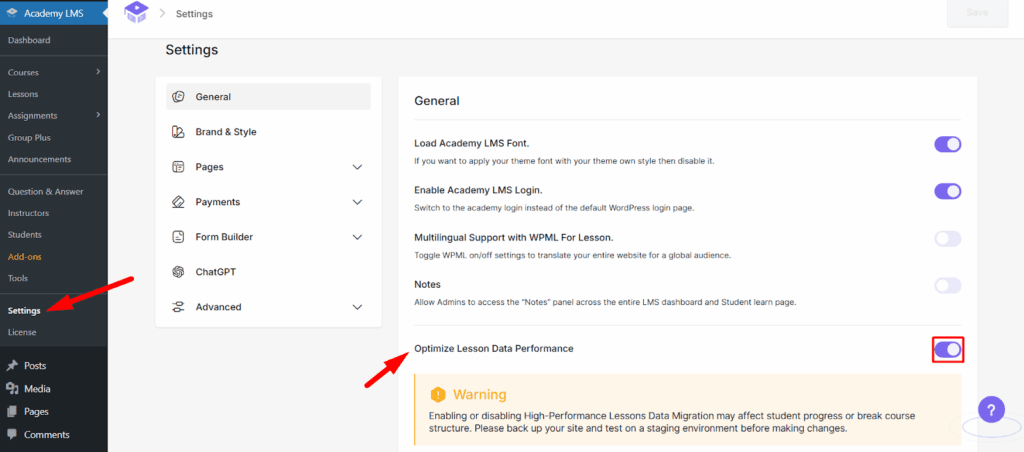
When enabled (default):
- Academy LMS stores lesson data in its own optimized table, instead of WordPress’s default wp_posts table.
- This results in better performance when loading lessons and improves scalability for large course websites.
However, enabling this also comes with some limitations:
- Customization on the student Learn page becomes limited.
- Users may not be able to fully control or design the Learn page using custom builders or templates.
When disabled:
- Lesson data is stored in the default WordPress post table.
- You will regain full customization power on the Learn page.
- Permalinks for lessons will work seamlessly without conflicts.
- Useful for sites with custom designs, templates, or deeply integrated themes.
- We recommend enabling PHP rendering when using the WordPress post table for maximum flexibility and performance compatibility.
Important Warning
Enabling or disabling this setting will migrate lesson data between database tables.
This action can affect:
- Student progress tracking
- Course content structure
- Page loading behavior
To ensure a safe experience:
- Always take a full site backup before toggling this setting.
- Consider testing the change on a staging environment if your site is live.
Default Behavior
This setting is enabled by default for optimal performance.
Academy LMS recommends keeping this setting enabled unless you specifically need advanced Learn page customizations.