









This guide will show you how to activate the Auto-Load Next Lesson and Auto-Complete Topic features in Academy LMS. These options make navigating through course content smoother for your students by automatically marking topics as complete and loading the next lesson seamlessly.
Step 1: Navigate to the Settings section from your dashboard.
Step 2: Access the Learn Page Settings: In the Settings menu, locate the Pages tab. Under Pages, click on Learn Page to access its settings.
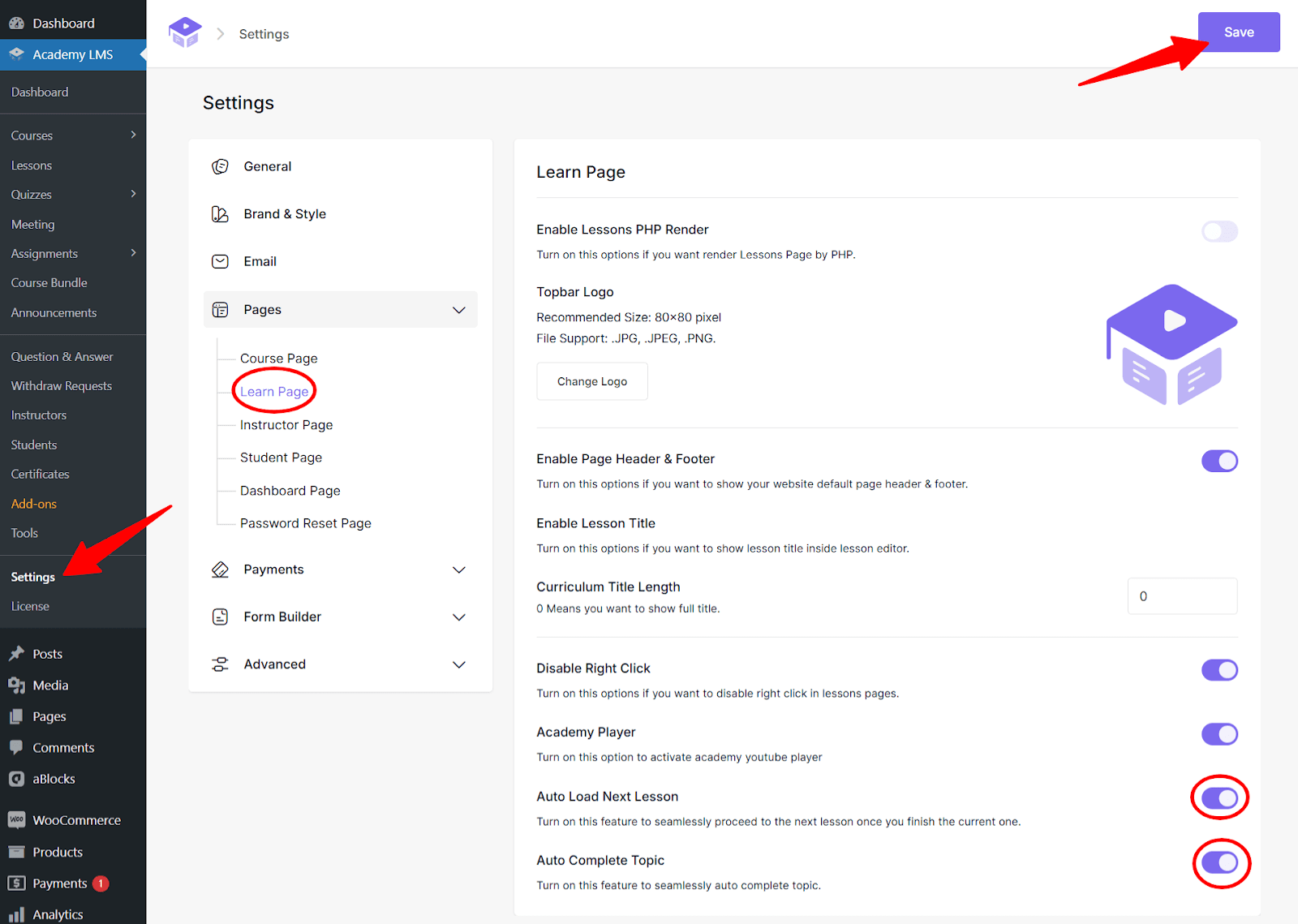
Step 3: Enable the Features: Scroll down to find the options for Auto Load Next Lesson and Auto-Complete Topic. Enable both options by toggling the switches to the “on” position.
Step 4: Save Your Changes: After enabling the features, scroll down to the bottom of the page. Click the Save button to ensure your changes are applied.
Note: The “Auto-Load Next Lesson” and “Auto-Complete Topics” features will not work if PHP rendering is enabled.
What Happens Next?
With these features enabled:
- When a student completes a topic, it will automatically be marked as “complete.”
- The next lesson will load automatically, eliminating the need for students to manually navigate between lessons.
- For course content other than lessons (like quizzes), the Auto-Complete Topic feature will mark the topic as complete only if the learner successfully passes the required activity.
- If the learner fails, the topic will not be marked as complete.
- For Assignments, since they require manual review by the instructor, the topic will not be marked as complete automatically.
- After the instructor reviews and approves the assignment, the topic will need to be manually marked as complete to reflect the learner’s progress.
This ensures a smoother and more engaging learning experience for your students.
By following these steps, you can easily set up Auto-Load Next Lesson and Auto-Complete Topic features in Academy LMS. These small changes can make a big difference in improving course flow and keeping students focused on their learning journey. Happy teaching!