Academy LMS 4.0 IS LIVE

00
Days
:
00
Hours
:
00
Minute
:
00
Second

Lesson Edit in Gutenberg

Lessons are normally managed inside Academy’s own React course builder, not in a standalone WordPress editor screen. Under the hood, though, Academy supports two different storage engines for lesson content, and only one of them is backed by a real WordPress post that the block editor can open directly.

The two lesson storage engines

Academy registers a genuine custom post type, academy_lessons (includes/database.php, create_academy_lesson_post_type()), with 'supports' => array('title','editor','author','thumbnail','excerpt','custom-fields','comments','post-formats') and 'show_in_rest' => true — everything the block editor needs. It is hidden from the wp-admin menu ('show_in_menu' => false), but a post of that type is fully editable at wp-admin/post.php?post={id}&action=edit if you know its ID.

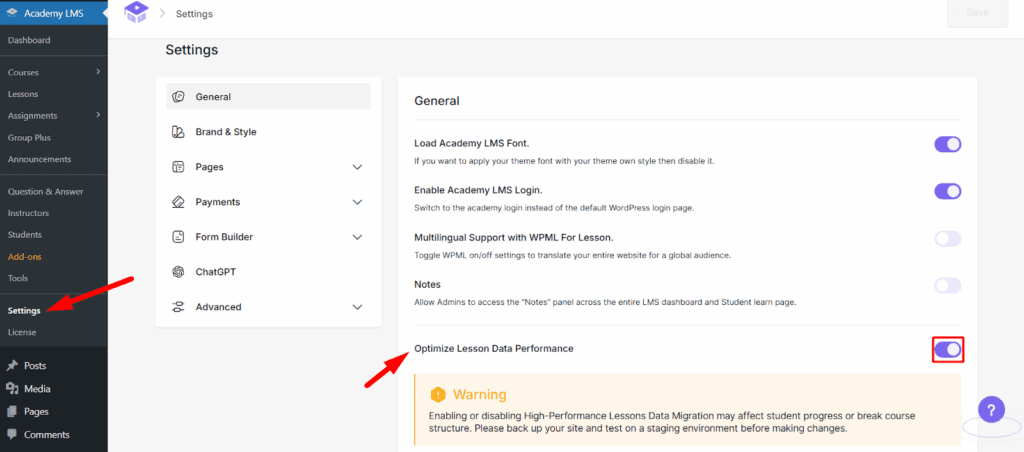
Whether a lesson is actually stored as one of these posts depends on a setting called Optimize Lesson Data Performance (academy_is_hp_lesson_active), found on the plugin’s Settings screen:

On (the default) — lesson content is kept in a dedicated custom database table (wp_academy_lessons), not in wp_posts. This is faster at scale, but there is no WordPress post behind each lesson, so there is nothing for the block editor to open.
Off — lesson content lives in ordinary WordPress posts of type academy_lessons, and the course builder’s Lessons table gains a WordPress Editor button/link per lesson that opens post.php?post={id}&action=edit — a real Gutenberg screen, with the full block inserter, for that lesson’s content.

This dual-engine design is implemented in includes/lesson/lesson-api/lesson.php (Lesson::is_hp()), which switches every lesson read/write between a HpLesson model (custom table) and a PostLesson model (the academy_lessons CPT) based on that setting. The relevant capability grant for instructors — edit_academy_lessons / edit_others_academy_lessons, added to the manage_academy_instructor role — is in includes/migration.php under the comment “Lesson Gutenberg editor support for instructor”, confirming this Gutenberg path is a deliberate, supported feature for sites running the classic (posts-table) engine.

How to access

1.Go to Academy LMS > Settings and find Optimize Lesson Data Performance. Toggling it off migrates existing lessons from the custom table into academy_lessons posts (a confirmation dialog explains the transfer direction before it runs).
2.Once the custom table is off, open Academy LMS > Lessons. Each row gains a WordPress Editor icon/button.
3.Clicking it opens wp-admin/post.php?post={lesson_id}&action=edit — the standard Gutenberg editor, with the lesson’s title and content as ordinary editable blocks.

What was verified live, and what was not

Verified live on the plugin’s dev site:

The site’s active setting is the default: Optimize Lesson Data Performance is ON. Querying the database directly confirmed lesson content lives in the custom wp_academy_lessons table (2 rows: “TEST1”, “Youtube”) and that the academy_lessons post type currently has zero posts — so there is no lesson post ID that post.php?post={id}&action=edit would resolve to on this install.
Academy LMS All Lessons
The course builder’s own lesson/topic curriculum view was opened and confirmed to be a custom React UI (drag-and-drop list of lessons, quizzes, and bookings under a topic), not an embedded Gutenberg instance.
Course Builder

What could not be verified live: actually flipping the “Optimize Lesson Data Performance” switch and screenshotting the resulting post.php?post={id}&action=edit Gutenberg screen for a migrated lesson. This action migrates real lesson data between storage backends site-wide (not a cosmetic UI toggle), and running it programmatically to bypass the browser was specifically blocked as a destructive/irreversible action by this environment’s safety controls; doing it by hand through the browser was judged too risky to attempt reliably in this session given the shared, actively-contended browser session encountered while producing the other screenshots in this batch (see the Site Editor and Dashboard docs for how that contention showed up). The mechanism above — dual storage engines, the settings toggle, the per-row “WordPress Editor” link, and the academy_lessons CPT’s full Gutenberg support — is confirmed directly from source (includes/lesson/lesson-api/lesson.php, dev_academy/containers/backend-dashboard/pages/settings/General/LessonMigration.js, dev_academy/containers/Lesson/LessonsTable.js), but the actual rendered Gutenberg lesson-edit screen was not captured.

If you need to confirm this yourself: turn off “Optimize Lesson Data Performance” in Settings, note a lesson’s ID from Academy LMS > Lessons, and open wp-admin/post.php?post={id}&action=edit directly — even though the academy_lessons post type has no wp-admin menu item, the URL works because show_in_rest and standard post capabilities are registered.