Academy LMS 4.0 IS LIVE

00
Days
:
00
Hours
:
00
Minute
:
00
Second

Kodezen Player

Kodezen Player is the video player that runs every lesson video in Academy LMS. It replaces the older Academy Player, tracks how much of a video a student has actually watched, and can require a minimum amount of watching before a video lesson counts as complete. A companion Text Reader reads lesson text aloud. Both are configured from one settings screen.

Note: Auto Load Next Lesson and Auto Complete Topic are Pro features. Everything else on this page is free.

Kodezen Player needs no setup

Kodezen Player is always on. There is no switch to turn it on, and the older Academy Player option is gone: Academy shows a reminder on the settings page that lesson video playback now always uses Kodezen Player.

Academy Player on off

Where the settings live

Go to Academy → Settings → Pages → Learn Page. This tab covers playback behavior. The learn page’s visual layout (colors, sidebar, top bar) has moved to Academy → Customize → Learn Page instead, with a live preview.

General playback settings

Auto Play (HTML5 Videos): play self-hosted lesson videos automatically when the lesson opens.
Enable Lesson Comment: let students comment on lessons.

Protecting playback

Three settings work together to stop students from skipping through a video:

Protecting playback Kodezen Player
Disable Right Click: stops right-clicking on lesson pages.
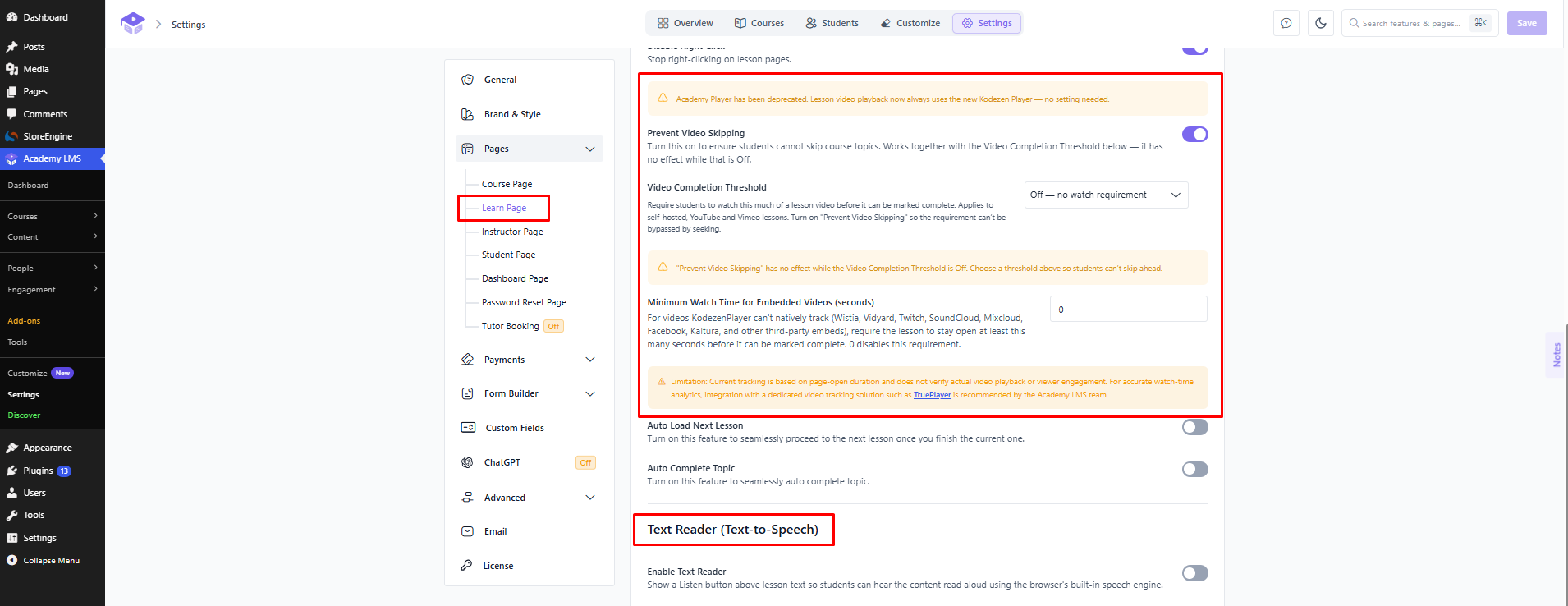
Prevent Video Skipping: blocks students from seeking ahead in a video. On its own it does nothing, it only takes effect once a Video Completion Threshold is set below.
Video Completion Threshold: how much of a video a student must watch before the lesson can be marked complete. Applies to self-hosted, YouTube and Vimeo lessons. Options are Off (no requirement), 70%, 100%, or a custom percentage from 1 to 100.

For videos Kodezen Player cannot natively track, such as Wistia, Vidyard, Twitch, SoundCloud, Mixcloud, Facebook and Kaltura embeds, use Minimum Watch Time for Embedded Videos instead. It requires the lesson page to stay open for a set number of seconds before the lesson can be marked complete. A value of 0 turns this requirement off.

Academy is upfront about the limits of this: watch time here is based on how long the page stayed open, not on confirmed playback. For real watch-time verification, the settings page links to TruePlayer as a dedicated tracking solution the Academy LMS team recommends.

Minimum watch time

Auto Load Next Lesson and Auto Complete Topic (Pro)

Two Pro toggles round out the playback settings:

Auto Load Next Lesson: moves straight to the next lesson once the current one finishes.
Auto Complete Topic: marks the current topic complete automatically instead of waiting for a manual action.
Auto Load Next Lesson and Auto Complete Topic

What students see

On the learn page, Kodezen Player replaces the video area for every lesson type it supports, complete with playback controls, speed and fullscreen. Students can see their progress through the curriculum sidebar as they work through lessons.

student side player

Text Reader (Text-to-Speech)

Below the video settings, Enable Text Reader adds a Listen button above lesson text so students can hear it read aloud using the browser’s built-in speech engine. It is free.

Turning it on reveals more options:

Text Reader (Text-to-Speech)
Hide Lesson Text: shows only the Listen player and hides the written text. The text stays available to screen readers.
Default Speech Speed: from 0.5x (slowest) to 2x (fastest); students can change this themselves on the lesson page.
Default Speech Pitch: from 0.5 (low) to 1.5 (high); 1 is the browser default.
Highlight Active Text: visually highlights the sentence currently being read.
Auto Scroll to Active Text: keeps the active sentence scrolled into view.

Troubleshooting

If Prevent Video Skipping is on but nothing seems to stop a student from jumping ahead, check the Video Completion Threshold. Prevent Video Skipping only has an effect once a threshold above Off is chosen, Academy shows a warning on the settings page whenever this combination is misconfigured.