











Welcome to Academy LMS! To start learning, you’ll first need to create a student account. Registration is quick and simple, giving you access to your personalized dashboard where you can manage courses, track progress, and view insights. Follow the steps below to get started.
Steps to Register as a Student
1. Navigate to the Student Registration Page
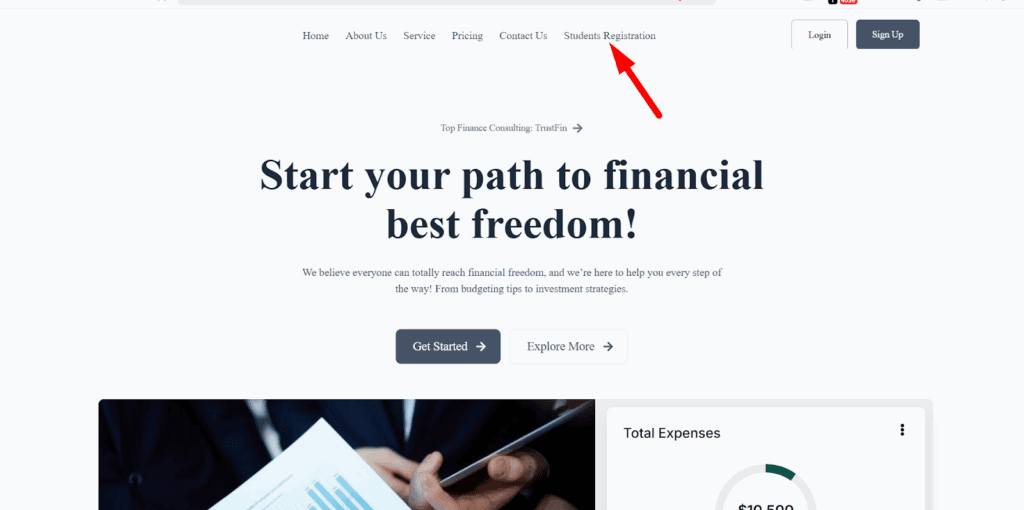
Locate the dedicated student registration page on the website. This is where you’ll begin the sign-up process.
Fill in the Required Information
On the registration form, provide the necessary details:
- Email Address
- First Name
- Last Name
- Password
Make sure your information is correct and that your password is strong enough to secure your account.
Once all the fields are completed, click the Submit button.
Access Your Student Dashboard
After submitting the form, your account will be created successfully. You’ll be redirected to your Student Dashboard, where you can:
- View all enrolled courses (if you already have any).
- Explore available courses to start learning.
- Access insights, progress tracking, and course details.
That’s it! You’re now registered as a student in Academy LMS. From your dashboard, you can easily manage your courses and start learning right away. Enjoy your learning journey!