









An online marketplace for teachers lets many instructors sell their courses on one website. Students browse, compare and enroll from a single catalog.
Think of a platform like Udemy, but owned and branded by you. You set the rules, the commission and the look of the site.
You don’t need a big tech team to build one. With WordPress and an LMS plugin like Academy LMS, you can launch in days, not months.
Courses, quizzes, certificates and instructor payouts come ready to use. You focus on finding good teachers and growing your audience.
This guide covers the key features, how teachers earn, and how to set everything up step by step.
We also look at microlearning, blended, social and mobile learning, plus the mistakes to avoid when you launch.
At a Glance: Online Marketplace for Teachers
|
Topic |
Quick Answer |
|
What it is |
A website where many teachers sell courses and students enroll from one catalog |
|
Who it’s for |
Online academies, training platforms, coaching, language, and corporate learning sites |
|
Platform |
WordPress |
|
LMS plugin |
Academy LMS 4.0 (multi-instructor support in the free version) |
|
How it earns |
The platform keeps a commission; teachers keep the rest (e.g., 80/20 split) |
|
Must-have features |
Instructor dashboards, frontend course builder, quizzes, certificates, revenue sharing |
|
Learning formats |
Microlearning, blended, social, and mobile learning |
|
Coding needed |
No, it’s built with ready-made plugins |
|
Best way to start |
Pick one niche, onboard quality teachers, and design for mobile first |
What Is an Online Marketplace for Teachers?
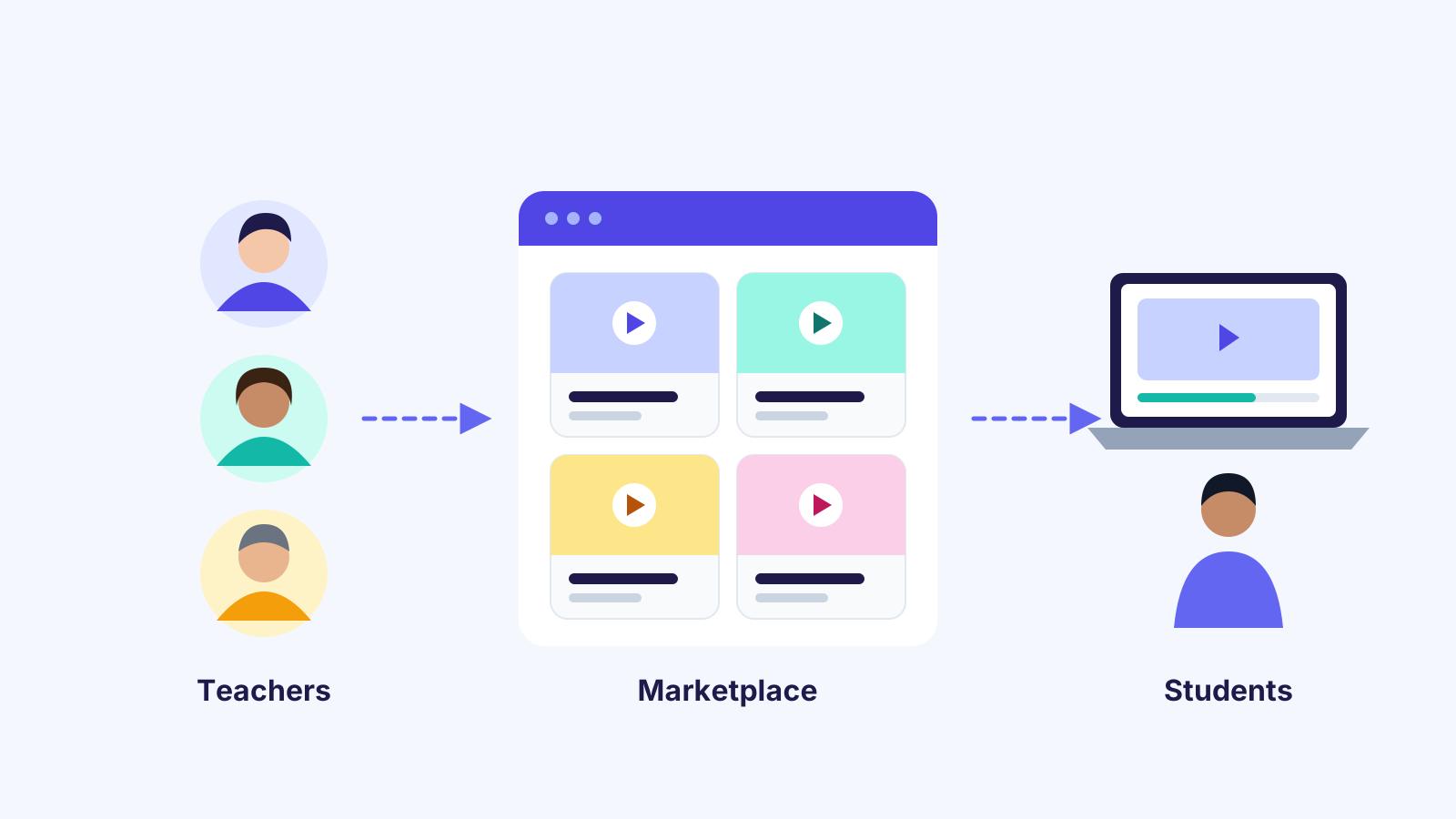
An online marketplace for teachers is a website where many teachers sell their courses. The site owner takes a small share of each sale.
Teachers keep the rest of the revenue. Everyone wins: teachers get an audience, and you earn from every enrollment.
It brings five things together in one place:
Teachers act as course vendors. Students discover courses from many educators and learn from one account.
Who is this model for?
Benefits of Running a Teacher Marketplace
A marketplace grows differently from a single-teacher course site. Here is why many education businesses choose this model.
Why Use WordPress to Build a Teacher Marketplace?
WordPress lets you build a marketplace with ready-made plugins. You don’t need heavy coding or a custom platform.
Add an LMS for the learning side. Then add payment, membership and marketing tools around it.
The basic flow looks like this:
Teachers create courses → Students discover them → Students purchase → Teachers earn revenue
The LMS handles learning, and payment tools handle sales. You can mix them to fit your business.
WordPress also gives you full ownership of your data, design and SEO. You are not locked into a third-party platform’s rules or fees.
The Role of the LMS Vendor
Your LMS vendor supplies the technology behind the learning side of your marketplace. A good vendor covers:
Choose your LMS vendor carefully, because you’ll depend on them for years.
Before you commit, check their documentation, update history and support quality. A vendor that ships regular updates keeps your site safe.
Why Academy LMS Is a Strong Foundation
Academy LMS is a WordPress plugin for creating and selling online courses. Version 4.0 makes building courses and quizzes faster and easier.
It’s a good fit because the main marketplace tools come built in:
Learn more in the multi-instructor addon guide, or try the Academy LMS live demo.
For advanced features, see Academy LMS Pro.
12 Essential Features of an Online Marketplace for Teachers
Before you build, list the features your marketplace can’t work without.
These twelve cover both the learning side and the business side. Missing any of them usually means unhappy teachers or lost sales.
1. Multi-instructor course creation
Every teacher needs their own space to manage courses, without admin access.
Their dashboard should show their courses, students, reviews and earnings in one place.
2. Teacher registration and approval
Not every user should become a seller. An approval flow keeps the quality of your catalog high:
Teacher applies → Admin reviews → Teacher approved → Course created → Course submitted → Admin approves → Course published
Ask applicants for a bio, experience and qualifications. A profile photo, social links and a sample lesson help you judge quality.
3. Frontend course builder
Teachers should build courses on the website itself, not in the WordPress backend.
They can add lessons, videos, quizzes and prices, then drag lessons into the right order.
4. Video-based learning
Video is the core format for most online courses.
Support self-hosted videos, YouTube, Vimeo and other hosts. That way, every teacher can use the tools they already know.
5. Quizzes and assessments
Quizzes help teachers check what students have learned.
Use them for practice tests, final exams or certification. Instant results keep students motivated.
6. Assignments
Assignments let students prove practical skills, not just theory.
A design teacher can ask for a project, a programming teacher for code, and a writing teacher for an essay.
7. Course pricing and payments
Different teachers and students prefer different ways to pay. Support several pricing models:
8. Teacher revenue sharing
Revenue sharing is what separates a marketplace from a regular course site.
The platform keeps a commission, and the teacher gets the rest. Here is a simple example:
|
Share |
Percentage |
Amount |
|
Course price |
100% |
$100 |
|
Teacher |
80% |
$80 |
|
Marketplace |
20% |
$20 |
You can set different rates by instructor, category or campaign.
Plan your commission early. Changing the terms later can upset the teachers who already trust you.
9. Instructor profiles
Students trust a course more when they know who is teaching it.
Show each teacher’s photo, bio, skills, ratings and reviews. A short intro video makes the profile even stronger.
10. Course reviews and ratings
Reviews help new visitors decide what to buy.
They also show you which teachers and courses perform best, so you know whom to promote.
11. Student progress tracking
Students should see how much they’ve completed, their quiz scores and their certificates.
Visible progress keeps learners going, especially in long courses.
12. Certificates
Certificates add value to professional and skills-based courses.
Include the student name, course name, instructor and completion date. Add a certificate ID and a way to verify it.
Build Different Learning Experiences with Your LMS eLearning Platform
Students learn in different ways, so your LMS elearning setup should support more than one format.
These four formats are the most in demand today. Offering them helps your teachers reach more students.
Microlearning LMS
Microlearning means short lessons on a single idea, like “Learn one Excel formula in 10 minutes.”
A microlearning LMS works well for busy professionals who learn during breaks. Short lessons also have higher completion rates.
Blended Learning LMS
Blended learning mixes online lessons with live or in-person classes.
A blended learning LMS helps schools and training centers deliver both. Students watch lessons online, then practice in class.
Social Learning LMS
Students also learn from each other, not just from the teacher.
Discussions, Q&A and group activities turn your site into a social learning LMS. This keeps students active and coming back.
Mobile Learning LMS
Most students now learn on their phones, so a mobile-friendly design is a must.
A mobile learning LMS lets students study anywhere. You can even turn your site into an app with ZenAppBuilder.
A flexible elearning LMS lets each teacher choose the format that fits their subject.
See how to create online courses with Academy LMS for a full walkthrough.
How Teachers Make Money on Your Marketplace
A marketplace grows only when its teachers earn well.
Give them several ways to make money, so they can choose what suits their audience:
The more ways teachers can earn, the more good teachers will join and stay.
Happy teachers also promote your marketplace to their own followers. That brings you new students at no extra cost.
Recommended WordPress Architecture
A teacher marketplace works best as a set of layers, each with one clear job:
|
Layer |
What it does |
|
WordPress |
The website foundation |
|
Academy LMS |
Courses, lessons, quizzes, certificates, instructors and commissions |
|
eCommerce and payments |
Checkout and payment gateways |
|
Membership |
Subscription-based access |
|
Community tools |
Discussions and social learning |
|
Email and marketing |
Promotions, announcements and student follow-ups |
The exact mix depends on your business model.
A simple paid-course marketplace may only need the first three layers. Add the rest as you grow.
How to Build Your Teacher Marketplace: Step-by-Step Workflow
Follow these ten steps to go from a fresh WordPress site to a working marketplace.
You’ll set things up as the admin first. Then teachers and students take over their own parts.
Step 1: Install Academy LMS
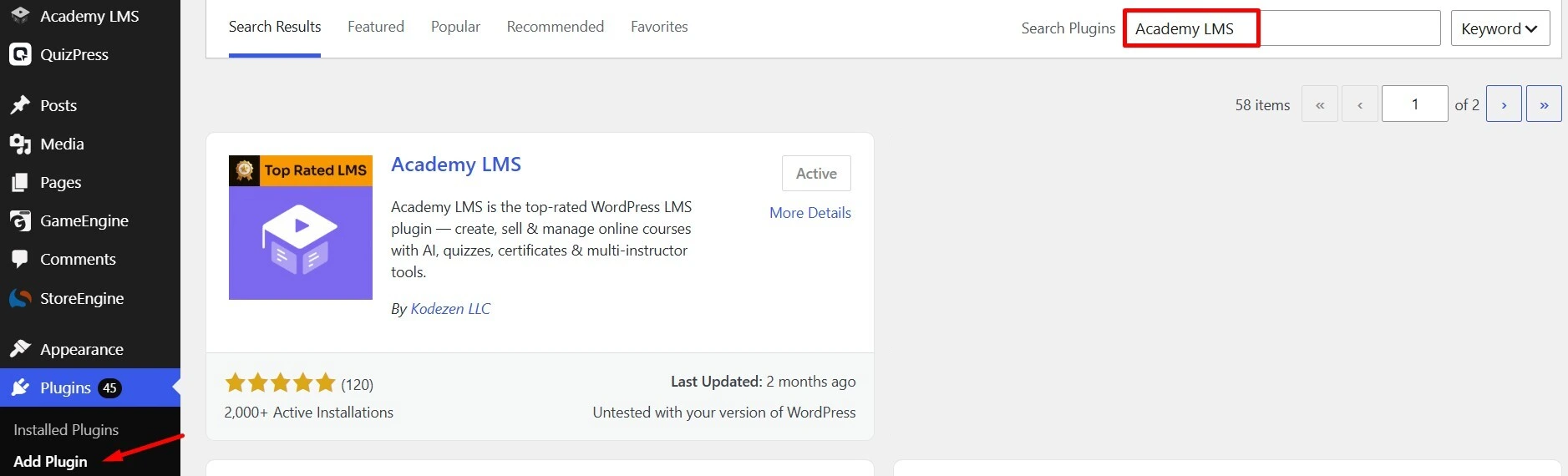
Go to Plugins > Add New in your WordPress dashboard and search for Academy LMS.
Install and activate it, then follow the setup wizard and the installation guide.
Step 2: Enable multi-instructor support
Turn on the multi-instructor addon from the Academy LMS addons page.
Set your commission rate here. This decides how much of each sale the platform keeps.
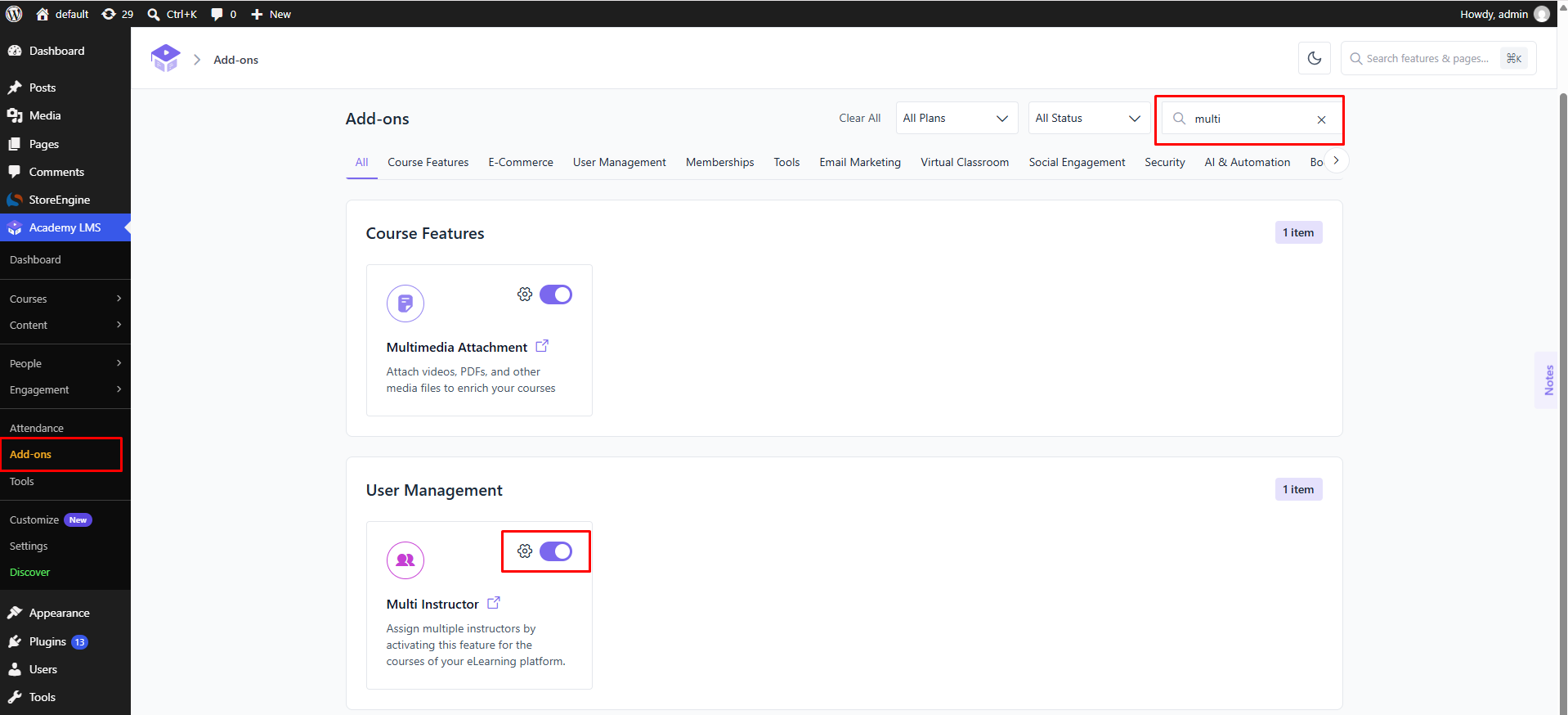
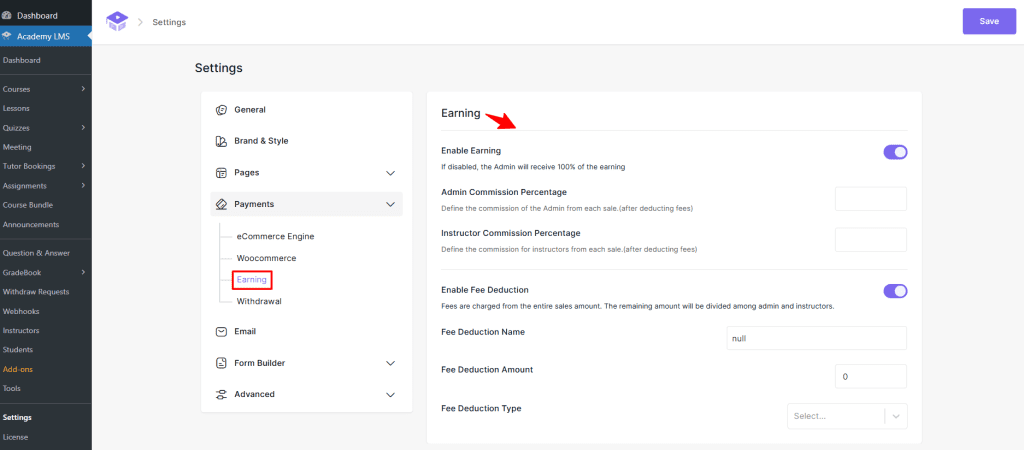
Note: Addons page with the Multi Instructor toggle and commission % settings.
Step 3: Open teacher registration
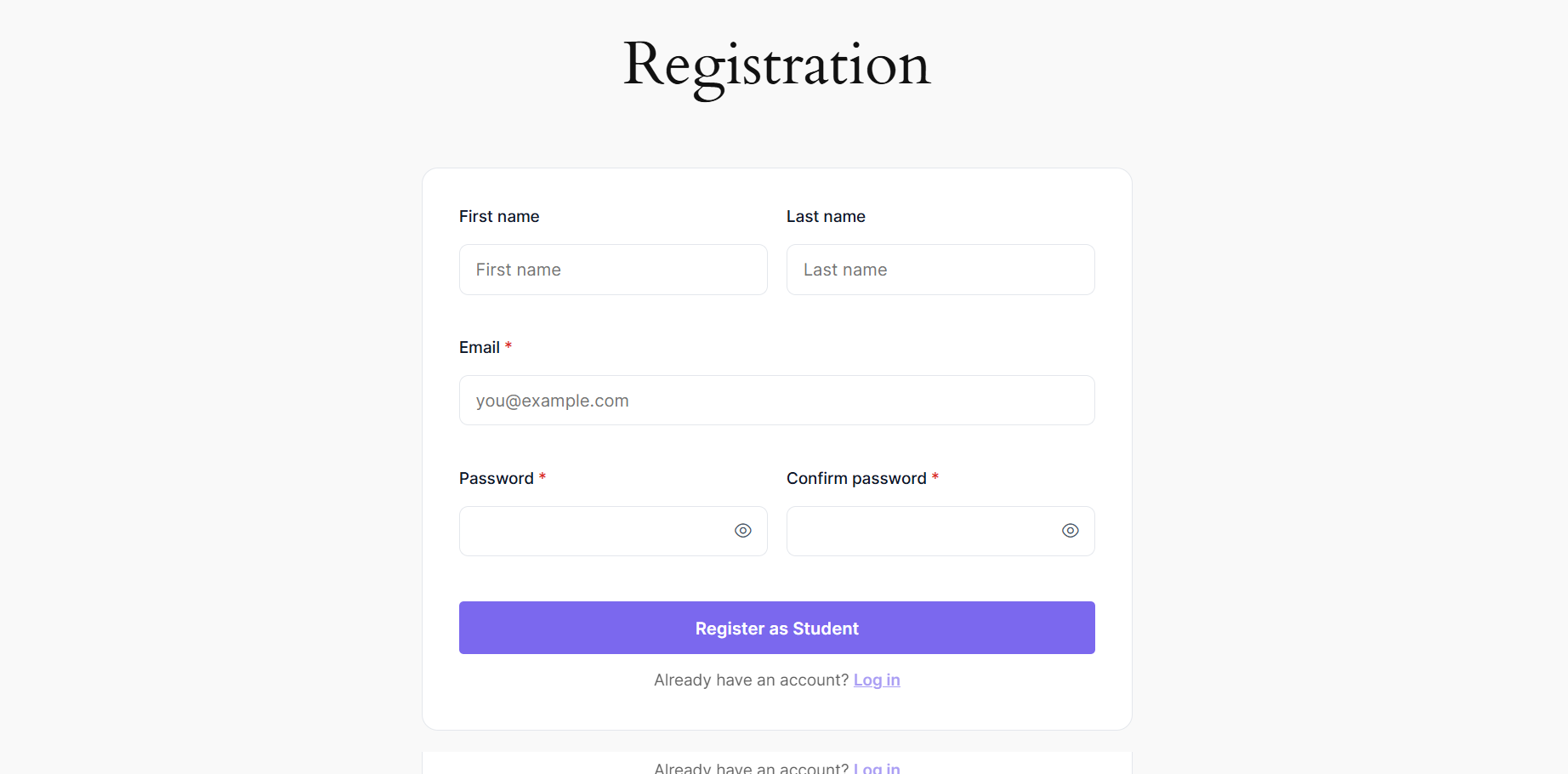
Teachers create an account and apply through your instructor form.
Use the registration form builder to ask for the details you need, like experience and a sample lesson.
Step 4: Approve teachers
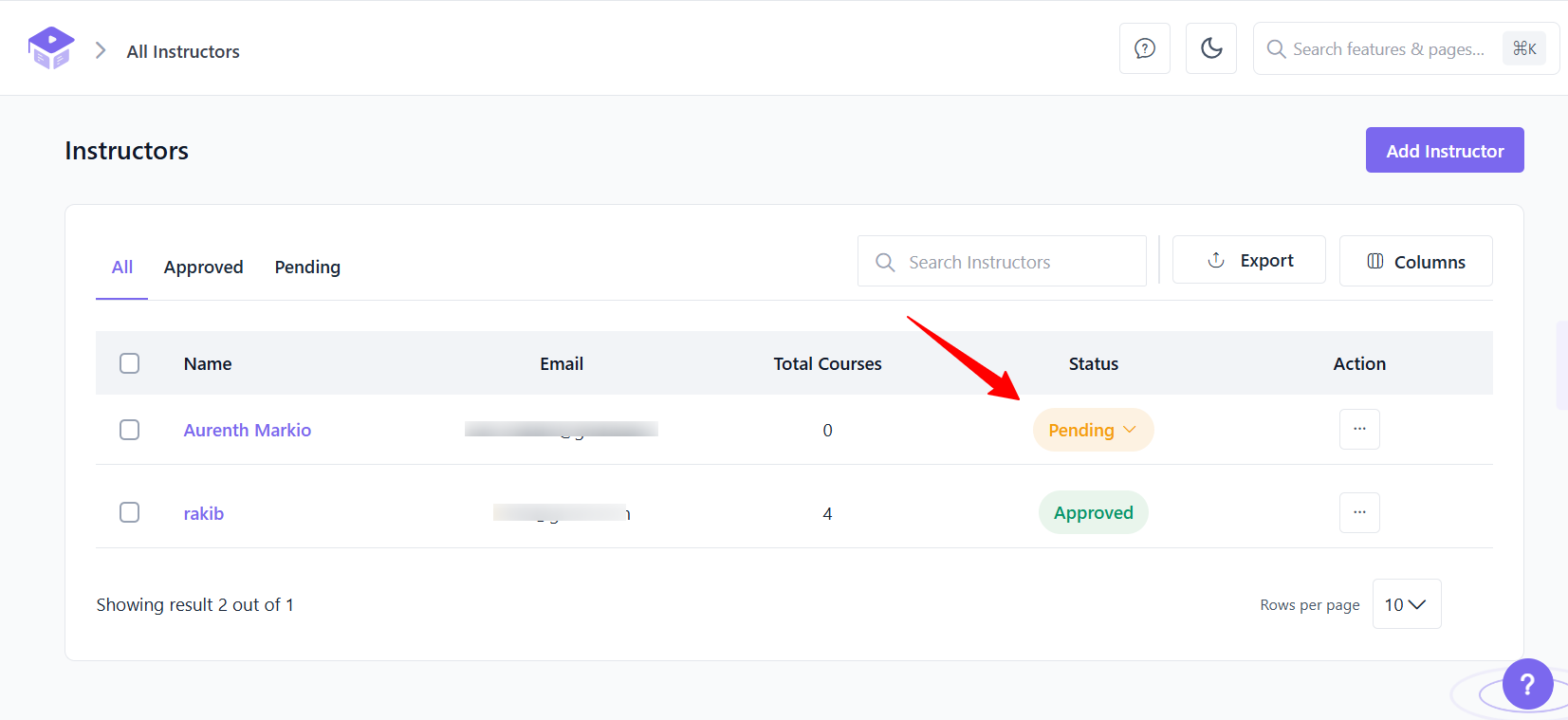
You review each application and accept or decline it.
Approve only teachers who fit your niche and quality standard. A strong first group sets the tone for your marketplace.
Step 5: Teachers build courses
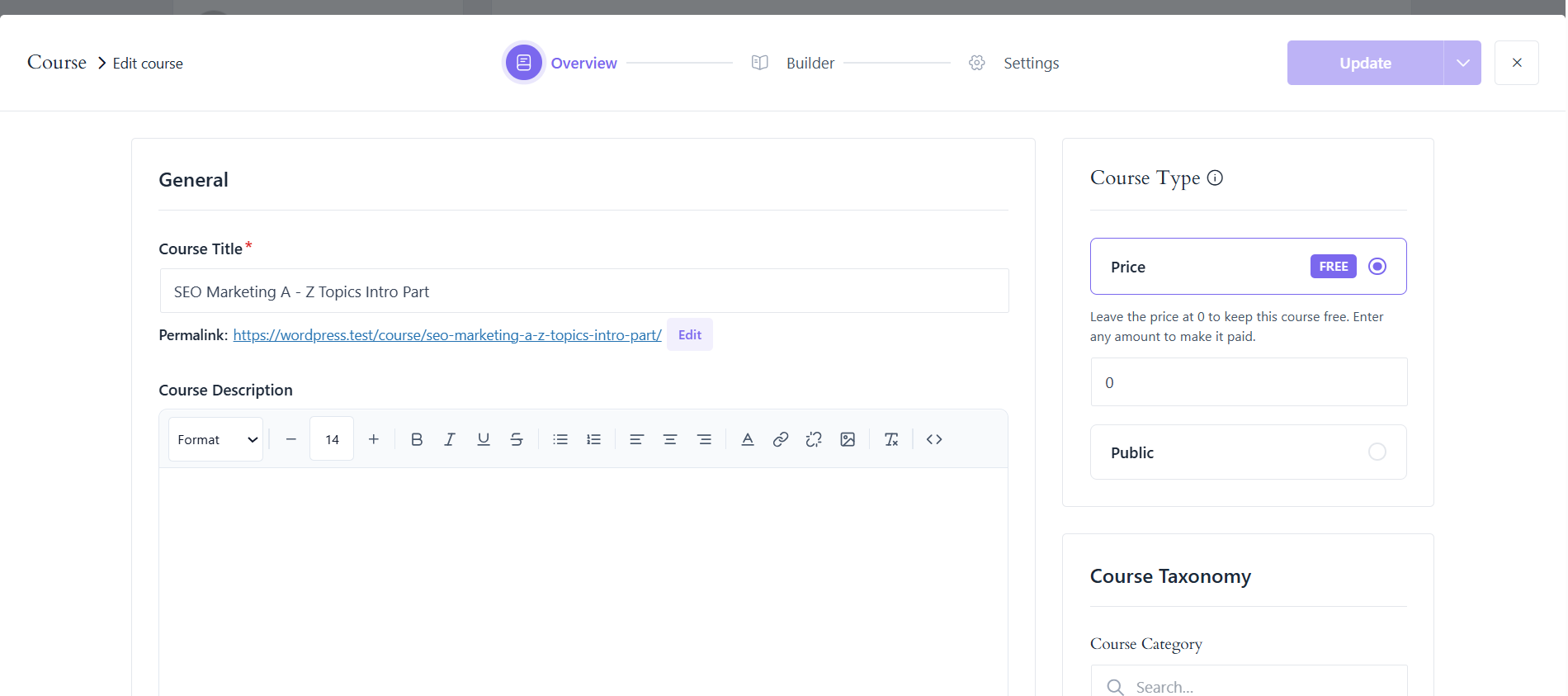
Instructors use the frontend course builder to add lessons, videos, quizzes and assignments.
They also set the course price, description and thumbnail without touching the WordPress admin.
Step 6: Review and publish
If moderation is on, you check each course before it goes live.
Look at video quality, lesson structure and pricing. Send feedback to the teacher if anything needs fixing.
Step 7: Students enroll
Students browse the catalog, then buy or join a course through checkout.
Free courses enroll instantly, while paid courses go through your payment gateway.
Step 8: Students learn
Students work through lessons, quizzes and assignments at their own pace.
When they finish, they earn a certificate they can download and share
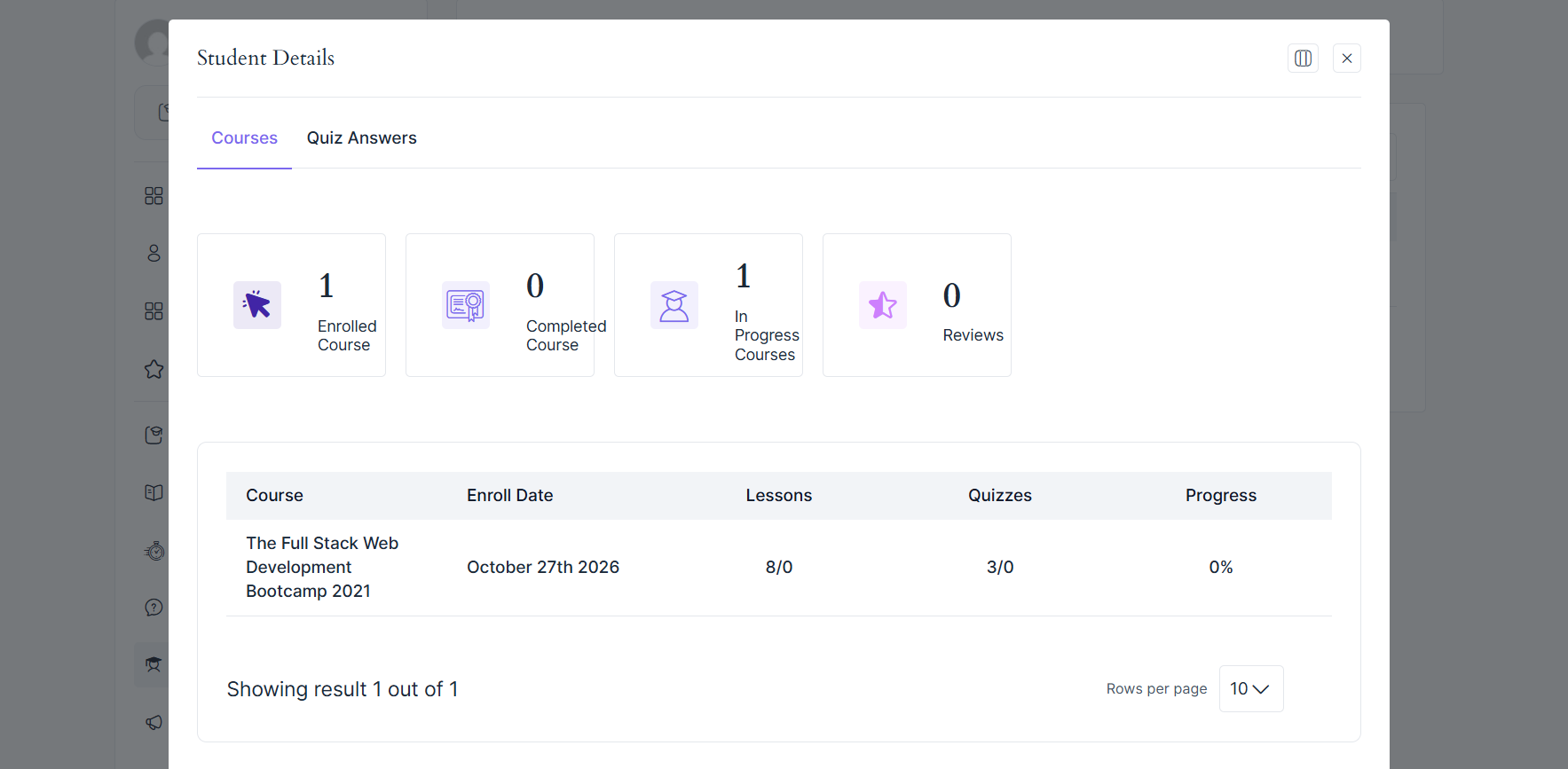
Step 9: Teachers track results
Instructors follow student progress and answer questions from their dashboard.
Analytics show which lessons work well and where students get stuck.
Step 10: Revenue is shared
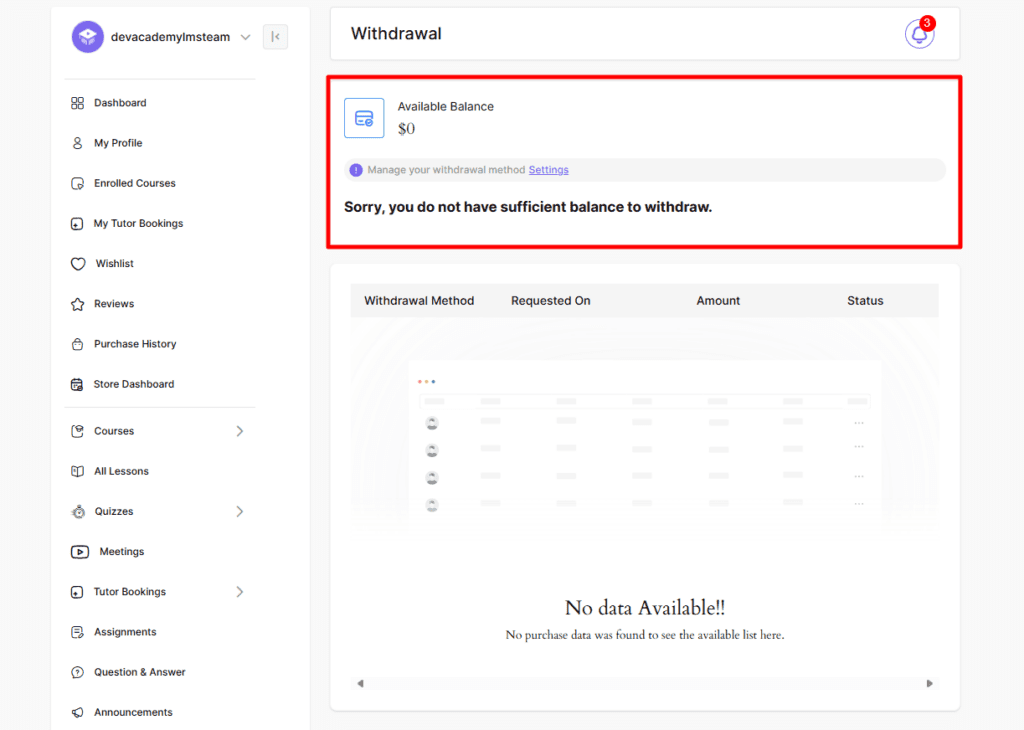
The platform keeps its commission, and the rest goes to the teacher’s earnings balance.
Teachers send a withdrawal request, and you approve the payout.
Academy LMS vs Building an LMS from Scratch
Building your own LMS means creating every part yourself, from quizzes to payment logic.
You also have to fix bugs and ship security updates forever. That takes a lot of time and money.
A ready-made LMS gives you all of it on day one. Your team can focus on teachers, students and marketing instead.
|
Feature |
Academy LMS |
Custom-built LMS |
|
Launch time |
Days |
Months |
|
Upfront cost |
Low |
High |
|
Maintenance |
Handled by the vendor |
Your team |
|
Marketplace features |
Built in |
Built from zero |
How to Make Your Online Marketplace for Teachers Successful
Installing an LMS is only the start. These habits decide whether your marketplace grows.
Focus on one niche
Start with one category instead of competing with every education platform.
Good options include programming, digital marketing, design, language learning, exam preparation and professional certification.
Make course discovery easy
Students leave if they can’t find what they want quickly.
Use clear categories, search, filters and featured courses to guide them to the right course.
Build trust in your teachers
New visitors don’t know your teachers yet.
Show credentials, ratings, reviews and free preview lessons on every course page.
Design for mobile first
Students learn while commuting or on short breaks.
A fast, mobile-friendly course player gives you a real edge over competitors.
Keep students coming back
Use email to announce new courses and re-engage inactive students.
Badges, certificates and leaderboards also help students finish what they start.
Related reading: Academy LMS vs Tutor LMS: The Best Tutor LMS Alternative · Academy LMS Documentation
Common Mistakes to Avoid
Many new marketplaces fail for the same few reasons. Avoid these from day one.
Final Thoughts
Building an online marketplace for teachers is no longer just for big companies.
WordPress and Academy LMS 4.0 give you everything you need to get started, without custom code.
Start with one niche and bring in great teachers. Then make learning easy on every device.
Ready to start? Get Academy LMS or try the live demo to see your future marketplace in action.
Frequently Asked Questions
Can I build an online marketplace for teachers with WordPress?
Yes. Combine an LMS like Academy LMS with payment tools to run a full multi-instructor course marketplace.
Can multiple teachers sell courses on one site?
Yes. Each teacher gets their own dashboard to create and sell courses, while you manage the platform as admin.
Do teachers need WordPress admin access?
No. A frontend course builder and instructor dashboard let teachers work without admin rights.
Can I charge a commission on course sales?
Yes. Academy LMS includes revenue sharing, so you can set the percentage the platform keeps from each sale.
How do teachers get paid?
Teachers build up an earnings balance from their sales. They send a withdrawal request, and you approve the payout.
What is the difference between an elearning LMS and a marketplace?
An elearning LMS delivers courses from one owner. A marketplace adds many sellers, instructor profiles and revenue sharing.
Can I offer both free and paid courses?
Yes. Free courses bring in new students, and paid courses generate revenue for you and your teachers.
Can I build a mobile learning LMS with WordPress?
Yes. A responsive theme works on any device, and ZenAppBuilder can turn your site into a native app.
Is Academy LMS free?
Yes, the core plugin is free and includes multi-instructor support. Academy LMS Pro adds advanced features.