
Building a sustainable online education business requires more than creating high-quality courses. Course creators also need a reliable way to generate revenue, retain students, and deliver ongoing learning experiences. This is where subscription models can make a significant difference.
Instead of charging students a one-time fee for every course, a subscription-based WordPress LMS allows businesses to offer course access in exchange for recurring monthly or annual payments. This approach helps course creators build predictable revenue while giving learners flexible and affordable access to educational content.
With WordPress, you can build a subscription-based learning platform using an LMS plugin such as Academy LMS and a compatible payment or membership solution. Depending on your setup, you can offer monthly course subscriptions, annual learning plans, tiered memberships, or all-access packages.
In this guide, you’ll learn how subscription models work, explore popular subscription pricing models, understand their benefits, and discover how to implement recurring payments on a WordPress LMS website.
Quick Overview of Subscription Models for WordPress LMS
What Are Subscription Models?
Subscription models are business strategies in which customers pay a recurring fee to access products, services, or content for a specific period. Instead of purchasing something permanently with a single payment, customers continue paying monthly, quarterly, or annually to maintain access.
In online education, subscription models allow students to access courses, learning resources, assessments, and other educational services for as long as their subscriptions remain active.
For example, a WordPress LMS website might offer these plans:
These plans give students different options based on their budgets and learning goals.
When combined with automated billing and course access management, subscription models can reduce manual administrative work and help course creators focus on improving their learning content.
Why Subscription Models Matter for WordPress LMS Websites
Traditional course sales usually depend on individual purchases. Once a student buys a course, the transaction is complete, and the creator must attract another customer to generate additional revenue.
Subscription-based learning platforms follow a different approach. They encourage students to maintain an ongoing relationship with the learning business.
Here are several reasons why this model is useful for WordPress LMS websites.
1. Create Predictable Revenue
Monthly and annual subscriptions help course creators estimate future revenue based on their active subscribers.
For example, if 200 students subscribe to a $15 monthly plan, the business generates $3,000 in monthly recurring revenue before fees, taxes, refunds, and cancellations.
This predictable income can help businesses plan content production, marketing campaigns, instructor payments, and platform maintenance.
2. Encourage Long-Term Student Engagement
Subscriptions work particularly well when courses are part of an ongoing learning journey.
Instead of completing one course and leaving, students can continue learning through new lessons, advanced courses, quizzes, projects, and other resources.
Regular content updates and structured learning paths give students more reasons to remain subscribed.
3. Reach Students With Different Budgets
A large one-time course fee can discourage some learners from enrolling. A lower monthly subscription may provide a more accessible alternative.
Course creators can offer several plans to accommodate beginners, professionals, and learners who need advanced training.
4. Simplify the Buying Experience
A subscription can give students access to multiple related courses through a single purchase. This is particularly useful for coding bootcamps, professional development platforms, language-learning websites, and certification preparation programs.
Popular Subscription Pricing Models for Online Courses
Choosing the right subscription pricing models is essential for attracting students and maintaining profitability. The best option depends on your content library, target audience, course delivery strategy, and business goals.
1. Flat-Rate Subscription Model
A flat-rate subscription provides access to a predefined collection of courses for one recurring price.
For example, a WordPress training website might charge $25 per month for access to all beginner and intermediate WordPress courses.
This model is straightforward because every subscriber pays the same price for the same level of access.
Best for: Small course libraries, focused training websites, and businesses offering a consistent learning experience.
2. Tiered Subscription Model
A tiered subscription model offers multiple pricing plans with different levels of access and benefits.
For example:
|
Plan |
Example price |
Included benefits |
|
Basic |
$9/month |
Beginner courses |
|
Professional |
$19/month |
All standard courses and quizzes |
|
Premium |
$39/month |
All courses, projects, and exclusive learning resources |
These prices are illustrative, not market averages.
Tiered pricing allows students to select a plan that matches their learning needs and budget. It also gives course creators opportunities to increase revenue by offering additional value at higher price points.
Best for: Growing course libraries and businesses serving students with different skill levels.
3. All-Access Subscription Model
An all-access subscription gives members access to a broad collection of courses for a recurring fee.
For example, a web development learning platform might provide access to courses covering HTML, CSS, JavaScript, WordPress, PHP, and plugin development through one monthly membership.
This model is particularly attractive when students want to explore multiple subjects without purchasing each course individually.
However, course creators should consider content production costs and the possibility that some students may consume a large amount of content while paying the same subscription price.
Best for: Large course libraries, online academies, and professional training platforms.
4. Course-Specific Subscription Model
A course-specific subscription charges students recurring fees for access to an individual course or a particular learning program.
For example, students might pay $12 per month to access an advanced JavaScript course with regularly updated lessons and projects.
This approach works well when a course provides ongoing value rather than a fixed set of lessons that students can complete quickly.
Best for: Specialized training, continuously updated technical courses, and professional certification preparation.
5. Membership-Based Subscription Model
A membership-based model combines educational content with additional benefits available only to paying members.
These benefits may include:
For example, a WordPress LMS website could offer a monthly membership that includes courses, practical projects, community discussions, and monthly live sessions.
Best for: Online academies, coaching businesses, professional communities, and creator-led learning platforms.
6. Freemium Subscription Model
A freemium model allows students to access selected courses for free while requiring a paid subscription for premium content.
Free courses can introduce learners to the platform and demonstrate the quality of its teaching. Students can then upgrade when they need more advanced lessons or additional resources.
For example, a coding website might provide free HTML and CSS courses while reserving JavaScript projects, advanced development lessons, and instructor support for paid subscribers.
Best for: New LMS websites, businesses building an audience, and platforms that want to convert free learners into paying customers.
Pricing Models: Subscription Models Comparison Table
|
Subscription Model |
Best For |
Main Advantage |
Strategic Risk |
|
Flat-Rate |
Small, focused course libraries |
Simple for buyers; consistent revenue |
Harder to scale revenue as catalog grows |
|
Tiered Pricing |
Growing libraries with mixed skill levels |
Captures multiple buyer budgets (Basic vs Pro) |
Can confuse buyers if tiers aren’t clearly differentiated |
|
All-Access Pass |
Large online academies / Bootcamps |
Maximum value perception; high initial sign-ups |
Heavy content consumption with fixed revenue per user |
|
Course-Specific |
Continuously updated/technical courses |
Targeted access for specific learning goals |
Lower overall LTV compared to full-membership passes |
|
Membership-Based |
Creator-led academies & communities |
Builds loyal community; high retention via live perks |
Requires ongoing manual effort (live Q&As, support) |
|
Freemium |
New platforms building an audience |
High top-of-funnel conversion and user acquisition |
Low free-to-paid conversion if free tier gives away too much |
How to Set Up Subscription Models With Academy LMS in WordPress
Academy LMS can help you build a WordPress learning platform where students access courses through recurring subscriptions. Depending on your business model, you can use StoreEngine for course subscriptions or connect a compatible solution such as WooCommerce Subscriptions or a membership plugin.
The exact requirements vary by integration. Some options require Academy LMS Pro or separately purchased premium extensions.
Screenshot placement: Add a screenshot of the Academy LMS course builder or payment settings here.
Step 1: Install and Configure Academy LMS
First, install and activate Academy LMS on your WordPress website.
Next, create your courses, lessons, quizzes, and other educational resources.
For detailed instructions, visit the Academy LMS documentation.
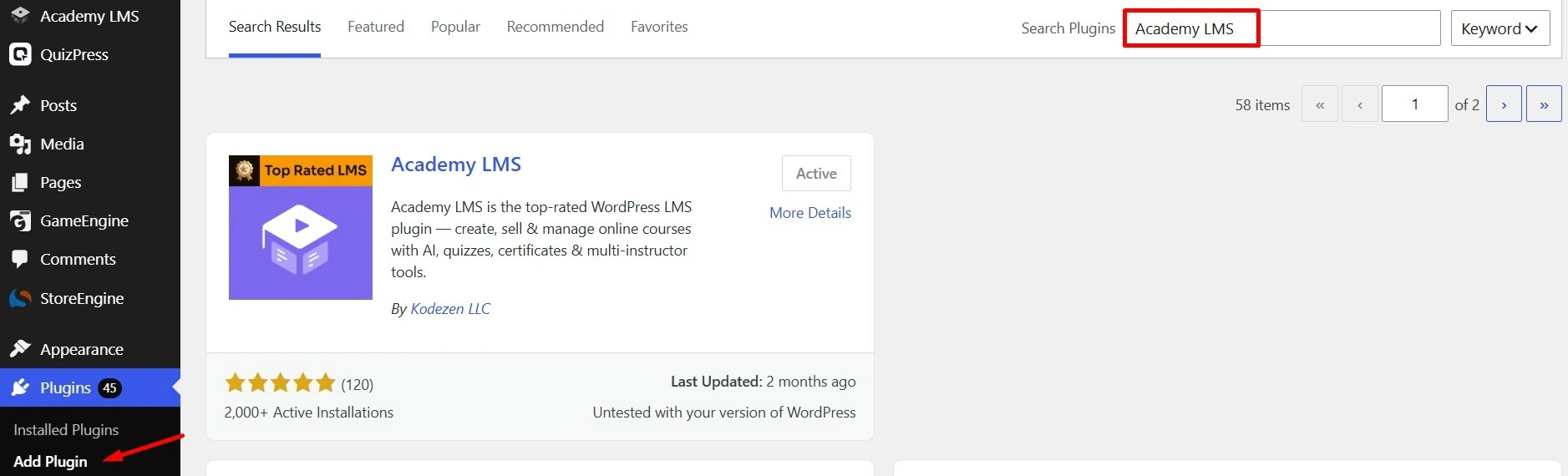
Step 2: Choose a Subscription and Payment Solution
Select a payment setup that supports the type of subscription you want to sell.
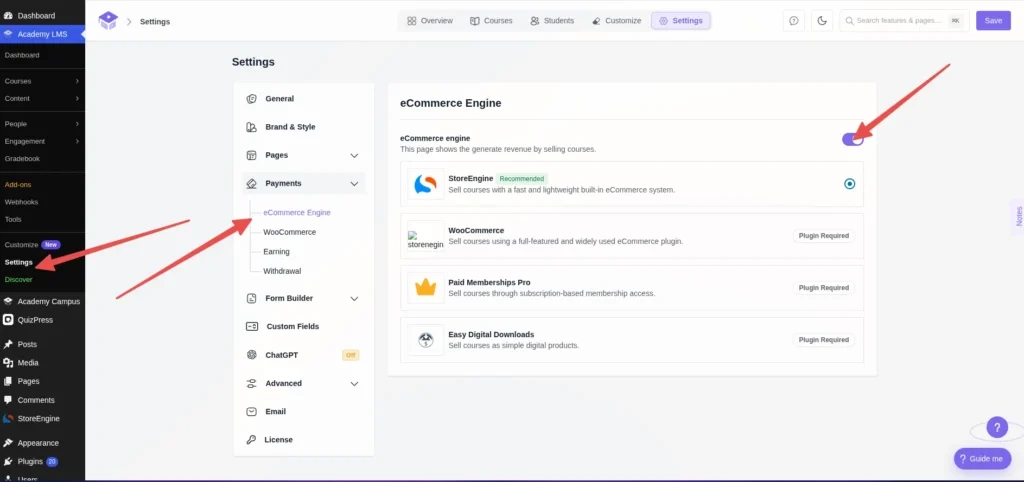
For example, StoreEngine provides an integrated option for selling courses through one-time or recurring subscription prices. Alternatively, WooCommerce Subscriptions can be used for supported course subscription setups, while compatible membership plugins can control access through membership plans.
For a StoreEngine setup:
For more details, follow the official guide to StoreEngine payment integration.
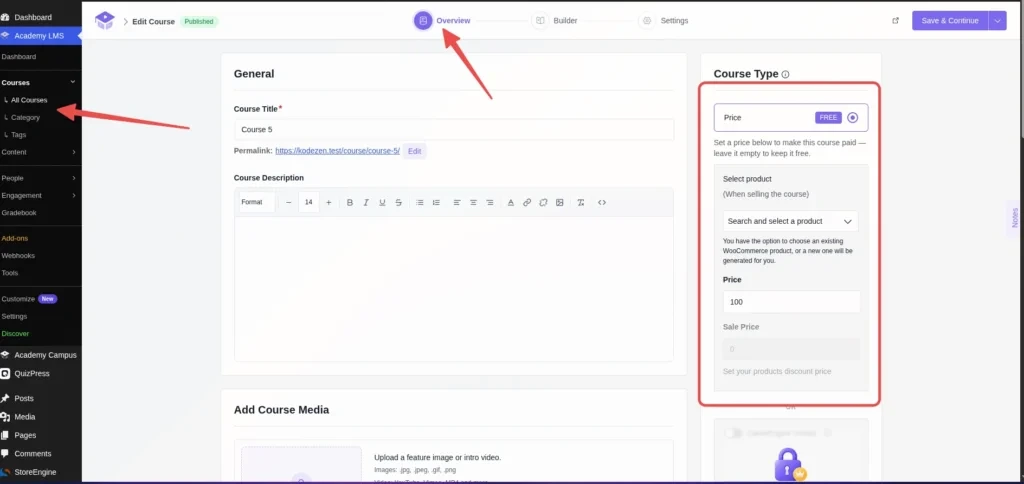
Step 3: Create a Subscription-Based Course
Once your payment solution is configured, create a course or edit an existing one.
For example, you could create a WordPress Development course with a $100 monthly subscription.
Make sure the selected payment solution supports the chosen billing interval and that the course is connected to the correct product.
Step 4: Create Membership Tiers or Course Packages
If you want to offer several subscription plans, define the benefits and access permissions for each tier.
For example:
For membership-based access, configure the relevant membership integration and associate the appropriate courses or categories with each plan.
Keep the differences between plans clear so students can understand why they might choose a more expensive subscription.
Screenshot placement: Show the configured subscription plans or membership levels.
Step 5: Configure Online Recurring Payments
Recurring billing should be configured through your selected payment or subscription solution.
Depending on the integration, you may need to configure a supported payment gateway, subscription renewal settings, billing intervals, and customer account options.
Before launching, test the complete purchase journey:
The goal is to ensure that students can subscribe easily and that payment status and course access remain properly synchronized.
Screenshot placement: Add a screenshot of the checkout page or subscription billing settings.
Step 6: Publish Your Subscription Plans
After testing the purchase and renewal process, publish your subscription plans on your website.
Create a pricing page that clearly explains the available plans, billing intervals, included courses, renewal terms, and cancellation policy.
You can also provide a free introductory course or sample lesson to help potential subscribers evaluate your teaching quality before paying.
For a smoother user experience, make the registration process, checkout, student dashboard, and support information easy to find.
Subscription Pricing: How to Choose the Right Price
Effective subscription pricing balances affordability for students with the costs of delivering and maintaining the learning experience.
Before setting a price, consider the following factors.
1. Understand Your Target Audience
Identify who your students are, what they want to learn, and how much ongoing value they expect.
Beginners may prefer affordable plans with essential courses, while professionals may be willing to pay more for advanced training, practical projects, and specialized resources.
2. Calculate Your Operating Costs
Include expenses such as:
Your pricing should cover these costs while leaving room for sustainable growth.
3. Analyze the Value of Your Content
Consider the quality, depth, and uniqueness of your courses.
A platform that offers updated professional training, practical projects, assessments, and expert support may justify a higher price than a small collection of introductory lessons.
4. Offer Monthly and Annual Billing
Monthly plans reduce the initial commitment, while annual plans can encourage longer-term subscriptions.
For example, you could offer a $20 monthly plan or a $200 annual plan. The annual option effectively provides two months at no additional charge compared with paying for 12 individual months.
Make the renewal terms, total price, cancellation policy, and any applicable taxes clear before checkout.
5. Monitor Subscription Performance
Track metrics such as monthly recurring revenue, subscriber churn, customer acquisition cost, conversion rate, and average revenue per subscriber.
Use these measurements to identify which plans perform well and where your pricing or learning experience needs improvement.
Avoid changing prices based only on competitor comparisons. Your own costs, audience, and retention data should guide decisions.
Benefits of Subscription Model for Online Learning Businesses
Understanding the benefits of subscription model strategies can help you decide whether recurring payments are appropriate for your education business.
Predictable Monthly Recurring Revenue
One of the main advantages is the opportunity to generate monthly recurring revenue (MRR) and annual recurring revenue (ARR).
These metrics help businesses monitor subscription income and evaluate growth over time. However, actual revenue can fluctuate because of cancellations, failed payments, refunds, and changes in subscription plans.
Improved Customer Lifetime Value
Customer lifetime value (LTV) estimates the revenue a business generates from a customer over the duration of their relationship.
When subscribers continue receiving value from a learning platform, they may remain customers for longer and contribute more revenue than they would through a single purchase.
Retention is not automatic, though. Students need relevant courses, useful learning resources, and a positive experience to justify continuing their subscriptions.
Opportunities to Upsell Premium Plans
Subscription businesses can introduce higher-priced plans as their course libraries and services grow.
For example, a student who initially subscribes to a basic WordPress course plan may later upgrade to a professional membership that includes advanced development courses and practical projects.
The upgrade should provide meaningful additional value rather than simply increasing the price.
Easier Content and Business Planning
Recurring revenue can help course creators estimate their available budget for producing new lessons, hiring instructors, and improving the learning platform.
By monitoring subscriber growth and retention, businesses can make more informed decisions about future investments.
Stronger Learning Communities
Subscriptions can support long-term relationships between students and instructors.
Discussion forums, group projects, live classes, and member-only events can help students stay engaged and create a stronger sense of community.
These experiences can also differentiate a learning platform from websites that sell individual courses without ongoing support.
Best Practices for Managing a Subscription-Based LMS
Launching a subscription business is only the beginning. Long-term success depends on delivering consistent value and reducing unnecessary cancellations.
Publish New Learning Content Regularly
Create a content calendar for new courses, lessons, tutorials, quizzes, or projects. Regular updates help subscribers understand the continuing value of their plans.
However, focus on quality and relevance rather than publishing content simply to maintain a schedule.
Reduce Subscriber Churn
Subscriber churn refers to the rate at which customers cancel their subscriptions during a particular period.
To improve retention, identify why students leave. Common reasons include outdated content, unclear value, technical difficulties, and pricing that no longer fits their needs.
Use student feedback, course completion data, and cancellation surveys to identify potential improvements.
Make Cancellation and Renewal Terms Clear
Explain how billing works before students subscribe. Provide clear information about renewal dates, cancellation procedures, refunds, and what happens to course access after cancellation.
Transparent policies build trust and reduce avoidable disputes.
Improve the Student Learning Experience
Organize courses into logical learning paths, make lessons easy to navigate, and provide assessments that help students measure progress.
A subscription should offer more than access to a collection of videos. Students are more likely to remain engaged when they can see meaningful progress toward their learning goals.
Review Pricing and Performance Regularly
Review your subscription metrics at regular intervals. If a plan has high cancellations, investigate the underlying cause before immediately reducing its price.
You may discover that students need clearer onboarding, more relevant content, better support, or a different course structure.
Common Mistakes to Avoid When Choosing Subscription Models
Avoid these common mistakes when building a subscription-based WordPress LMS.
Offering too many plans: Too many options can confuse potential customers. Start with a small number of clearly differentiated tiers.
Setting prices without calculating costs: A low subscription price may attract customers but still produce losses if content delivery and support are expensive.
Ignoring retention: Acquiring new subscribers is not enough. You also need to provide ongoing value so existing customers have reasons to stay.
Using incompatible payment tools: Confirm that your LMS, eCommerce engine, subscription extension, and payment gateway work together before launching.
Failing to test renewals: A successful initial payment does not guarantee that future billing, cancellations, and access changes will work correctly.
Making cancellation difficult: Complicated cancellation processes can damage trust and increase complaints.
By avoiding these mistakes, you can build a more reliable subscription experience for both students and administrators.
Conclusion
Subscription models offer WordPress LMS owners a practical way to build recurring revenue, provide ongoing educational value, and establish longer-term relationships with students.
From flat-rate subscriptions and tiered pricing to all-access memberships and course-specific plans, the right approach depends on your content, audience, and business objectives.
With Academy LMS and a compatible payment or membership solution, you can create a learning platform that supports recurring course sales and structured access to educational content.
Start with a simple pricing strategy, make the subscription benefits clear, test your billing and access rules, and continue improving your courses based on student feedback. Over time, a well-managed subscription business can become a more sustainable model for delivering online education.
Frequently Asked Questions (FAQs)
What are subscription models in online education?
Subscription models allow students to pay recurring fees, such as monthly or annual payments, to access online courses, learning resources, or membership benefits. They provide course creators with an alternative to relying exclusively on one-time course sales.
What are the most popular subscription pricing models for WordPress LMS websites?
Popular options include flat-rate subscriptions, tiered pricing, all-access subscriptions, course-specific subscriptions, membership-based plans, and freemium models. The best choice depends on the size of your course library and the needs of your audience.
What are the main benefits of a subscription model?
The main benefits include more predictable recurring revenue, opportunities to increase customer lifetime value, flexible pricing options, ongoing student engagement, and better long-term business planning. These benefits depend on subscriber retention and the ongoing value of the learning experience.
Can I create subscription-based courses with Academy LMS?
Yes. Academy LMS supports subscription-based course-selling workflows through compatible eCommerce and membership integrations. StoreEngine offers a course subscription option, while other supported setups may require Academy LMS Pro and separately purchased subscription or membership software.
How do online recurring payments work for an LMS website?
Online recurring payments allow a payment provider or subscription system to charge subscribers automatically according to a defined billing schedule. The LMS and its connected payment solution must be configured to manage course access appropriately when payments succeed, fail, or are cancelled.
Should I offer monthly or annual subscription pricing?
Offering both can accommodate different customer preferences. Monthly subscriptions have a lower initial commitment, while annual plans can encourage longer-term commitments. Compare conversion rates, renewal rates, revenue, and customer feedback to determine which option works best for your audience.
How can I reduce subscription cancellations?
Publish useful new content, improve the onboarding process, provide responsive support, organize clear learning paths, and gather feedback from cancelling subscribers. Most importantly, ensure that your platform continues delivering enough value to justify the recurring fee.