
Quizzes are an essential part of a WordPress LMS. It help instructors evaluate learner understanding, reinforce key concepts, and make online courses more engaging and interactive.
However, an effective quiz is not limited to a single question format.
Depending on the lesson topic and learning objectives, instructors may need different types of quiz questions, including multiple-choice, True/False, image-based questions, and open-ended questions that allow learners to provide their own answers.
Modern eLearning platforms make it easier than ever to create a variety of assessments without requiring complex development or coding.
By using the right quiz question types, instructors can create more effective assessments, measure learner progress, and provide a better overall learning experience.
Best Practices for Creating Effective Quizzes
Creating different question types is only one part of building a good quiz. The questions themselves should be clear, relevant, and aligned with your learning objectives.
Here are some best practices to follow.
1. Keep Questions Clear
Avoid unnecessary complexity.
A learner should understand what the question is asking without having to interpret confusing wording.
2. Focus on the Learning Objective
Every question should have a purpose.
Before creating a question, ask yourself:
What do I want the learner to demonstrate?
Then choose a question format that matches that objective.
3. Use Different Question Types
Avoid creating an entire quiz using only one question format.
Combining different types can make the assessment more engaging and allow you to test different skills.
4. Create Plausible Answer Options
For multiple-choice questions, incorrect answers should be reasonable enough to test the learner’s understanding.
Avoid obviously incorrect or unrelated options.
5. Add Explanations
When possible, provide explanations after questions.
An explanation can turn a simple assessment into an additional learning opportunity.
6. Avoid Ambiguous Questions
Make sure there is a clear correct answer.
Avoid questions where multiple options could reasonably be interpreted as correct unless the question is specifically designed to have multiple correct answers.
7. Keep Questions Relevant
Questions should relate directly to the course material.
Avoid adding questions simply to increase the number of questions in a quiz.
Types of Quiz Questions You Can Build in WordPress LMS
Different question formats allow instructors to evaluate different types of knowledge and skills.
Academy LMS provides several question types that can be used to create engaging assessments.
1. True/False Questions
True/False questions are one of the simplest ways to test whether learners understand a specific statement or concept.
Learners choose between two possible answers: True or False.
Example
HTML is used to structure the content of a web page.
True/False questions are useful for:
If you’re wondering how to make True or False questions, the process is straightforward: create a clear statement and provide True and False as the possible answers.
When Should You Use True/False Questions?
Use this format when the learning objective can be evaluated with a clear statement that has one definite answer.
Avoid overly complicated statements because they can make questions confusing rather than educational.
2. Single Choice Questions
Single-Choice questions allow learners to select one correct answer from several available options.
For example:
Which language is primarily used to style web pages?
The learner selects CSS as the correct answer.
Single-Choice questions are useful when:
Why Use Single Choice Questions?
They are flexible and can be used for almost any subject.
For example, an instructor teaching programming could ask about syntax, concepts, functions, or best practices.
3. Multiple Choice Questions
Multiple Choice questions allow learners to select more than one correct answer when a question has multiple valid responses.
For example:
Which of the following are programming languages?
In this example, PHP, JavaScript, and Python are programming languages, while HTML is a markup language.
This makes Multiple-Choice questions useful for testing whether learners can identify all applicable answers rather than simply choosing one.
Quiz Questions With Multiple Correct Answers
If you’re looking for quiz questions with multiple correct answers, this question format is particularly useful.
You can create questions where:
This format can be useful for testing more detailed understanding of a topic.
4. Dropdown Questions
Dropdown questions allow learners to select an answer from a predefined list.
Instead of displaying all options as separate choices, the available answers can be presented through a dropdown interface.
For example:
The CSS property used to change text color is _____.
The learner selects:
color
from the available options.
Dropdown questions are useful when:
They can also make quizzes more interactive while keeping the question layout clean.
5. Short Answer Questions
Short Answer questions allow learners to enter their own responses instead of selecting from predefined options.
For example:
What does CSS stand for?
The learner enters:
Cascading Style Sheets
This question type can be useful for testing:
Short Answer questions are particularly useful when you want learners to produce the answer themselves rather than recognize it from a list of options.
6. Image Answer Questions
Sometimes text-based answers are not enough.
For subjects such as design, geography, science, medicine, technology, or visual learning, images can make assessments more effective.
Academy LMS provides an Image Answer question type that allows instructors to use images as answer choices.
For example, an instructor teaching web design could show several interface layouts and ask:
Which layout follows the design principle discussed in this lesson?
Learners can then select the appropriate image.
Quiz Images and Pictures
If you’re searching for ways to create quizzes using quiz images or pictures, image-based questions can be a useful approach.
They can be used for:
7. Fill in the Blanks Questions
Fill in the Blanks questions require learners to complete missing information in a sentence or statement.
For example:
HTML stands for HyperText ______ Language.
The learner needs to provide:
Markup
This format is useful for testing whether learners can recall important terms, concepts, or phrases.
When to Use Fill in the Blanks Questions
Consider using this format for:
Fill in the Blanks questions can be particularly effective when learners need to recall information rather than simply recognize an answer.
How to Create a Quiz in Academy LMS
Before exploring the different types of quiz questions, let’s look at how you can create a quiz using Academy LMS.
Academy LMS provides quiz functionality that allows instructors to create questions, configure answers, assign points, and provide explanations to learners.
Step 1: Install and Activate Academy LMS
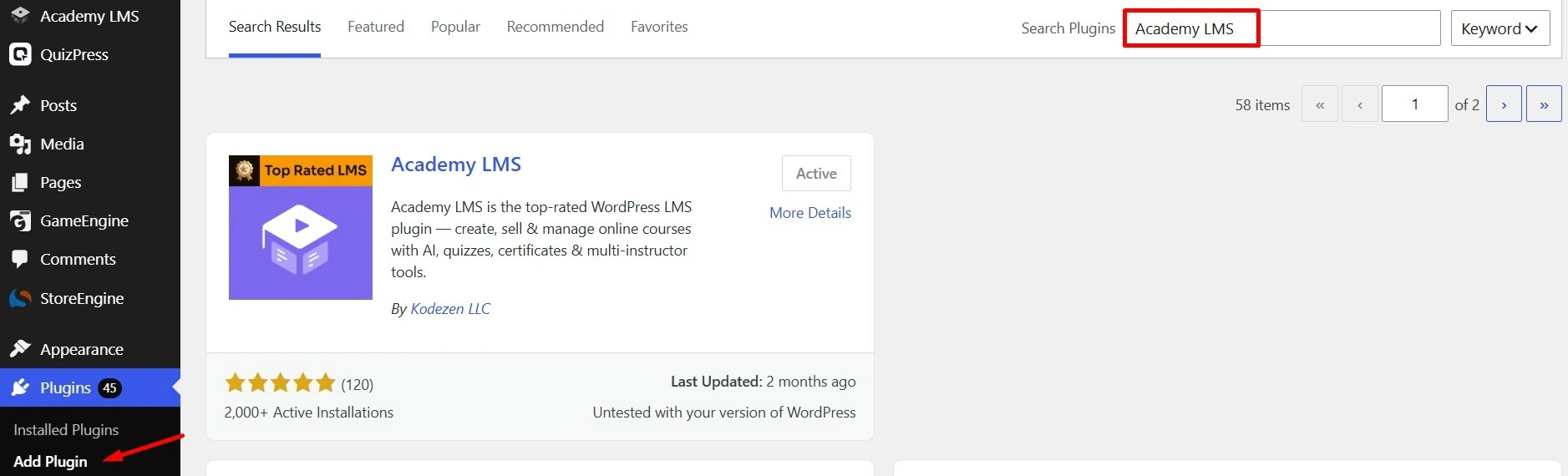
First, install and activate Academy LMS on your WordPress website.
After activation, you can access Academy LMS features from your WordPress dashboard.
Step 2: Enable the Quizzes Add-on
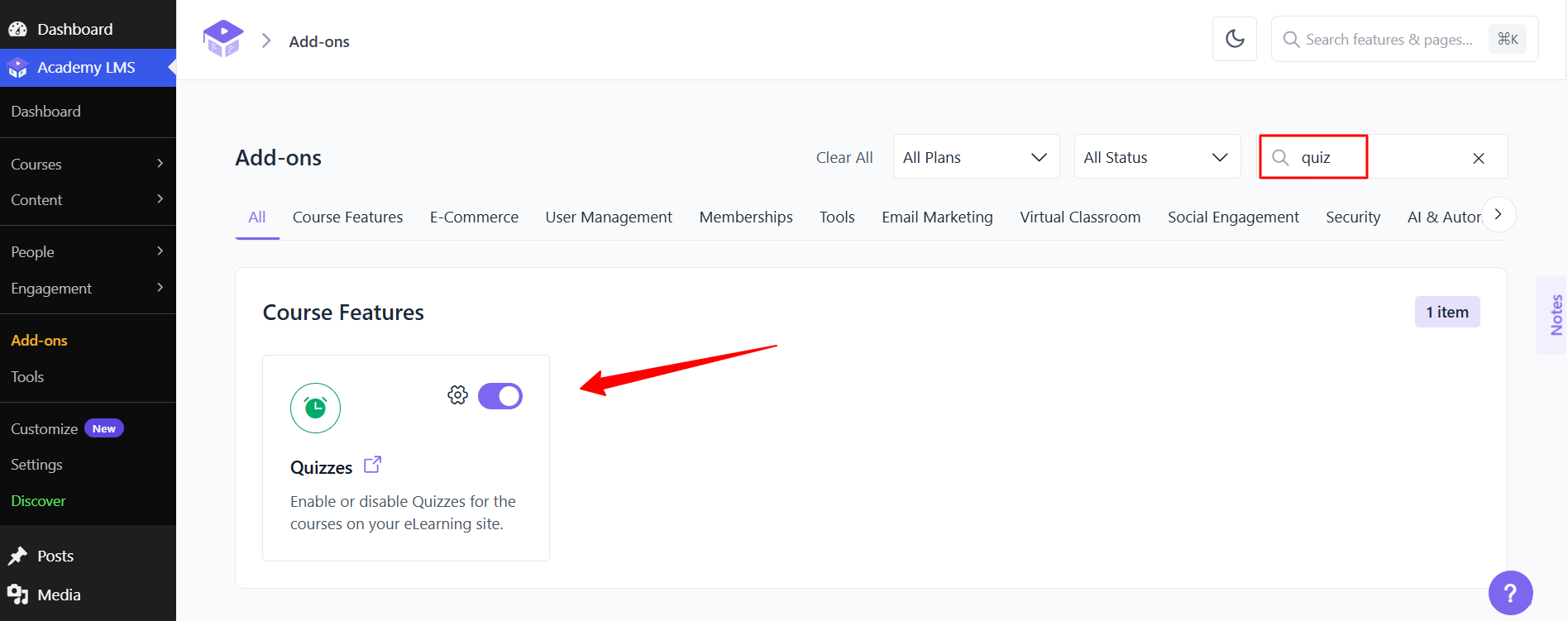
From your WordPress dashboard, navigate to the Academy LMS add-ons section and enable the Quizzes functionality.
This enables you to create quizzes and add different types of questions to your courses.
Step 3: Create a Quiz
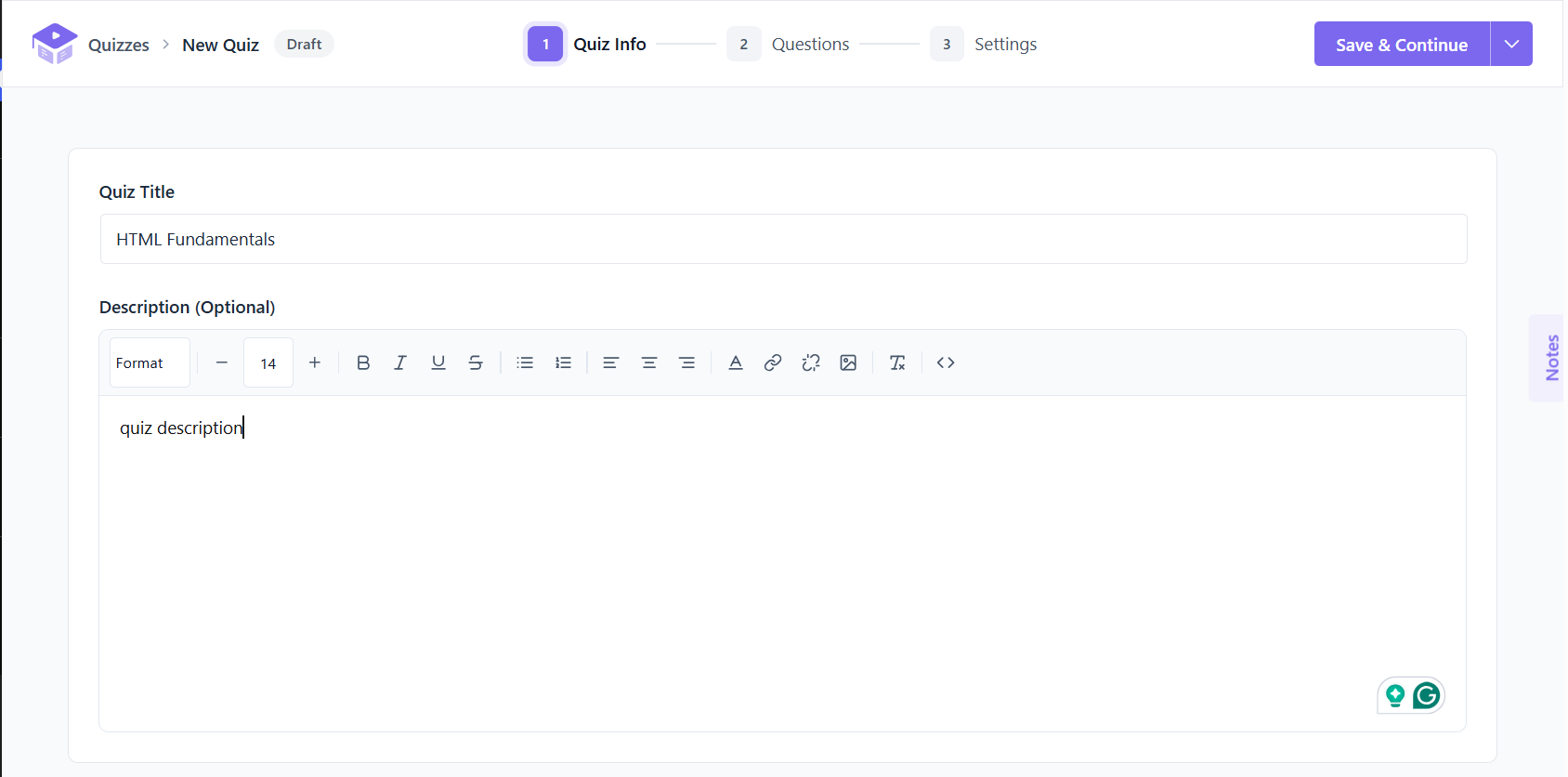
Once the quiz functionality is enabled, create a new quiz from the Academy LMS quiz area.
Add a descriptive title so learners can easily understand what the quiz is about.
For example:
Quiz: HTML Fundamentals
You can then configure the available quiz settings according to your course requirements.
Step 4: Add Questions
After creating your quiz, use the Add Question option to start adding questions.
Academy LMS provides multiple question formats, allowing you to choose the format that best matches your learning objective.
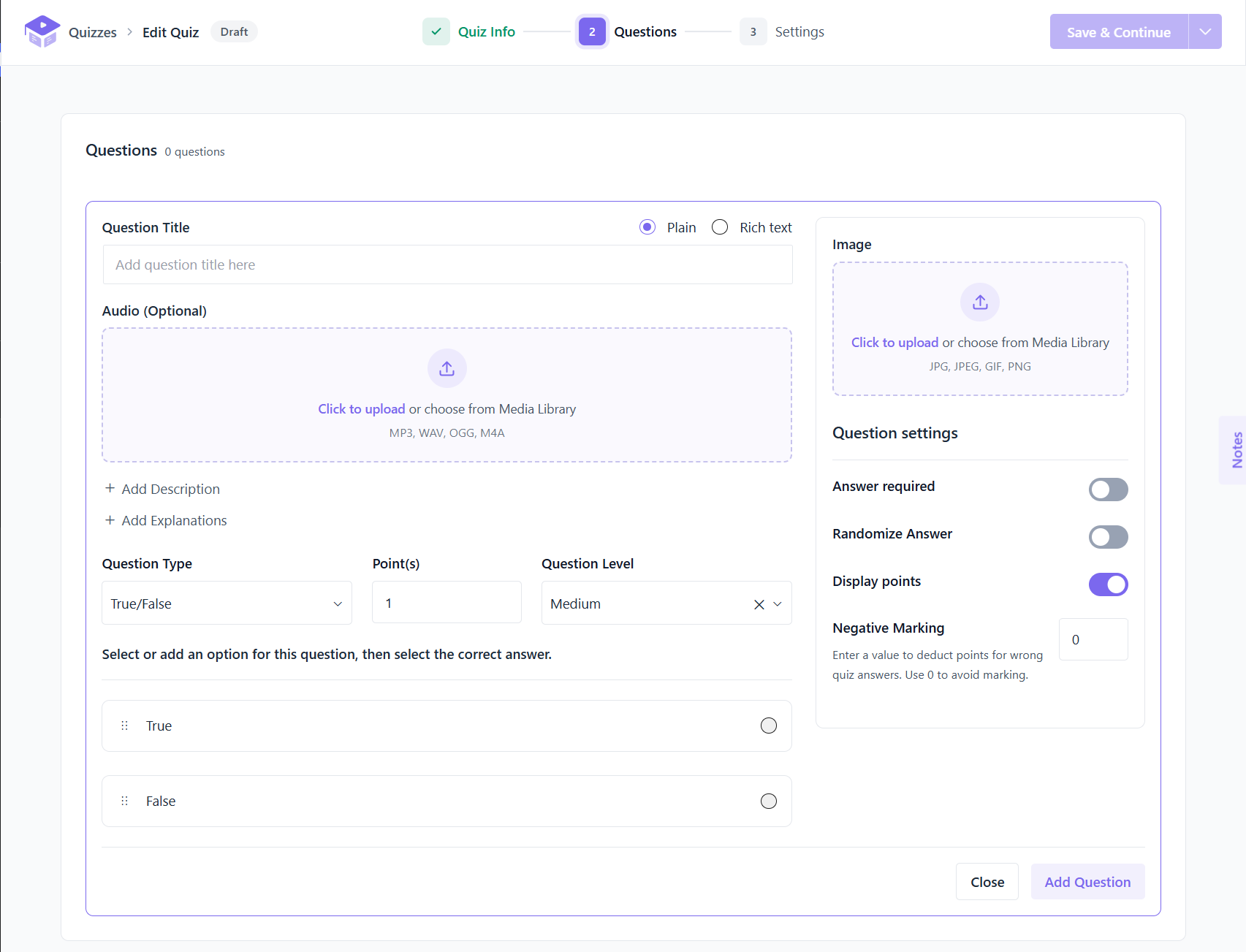
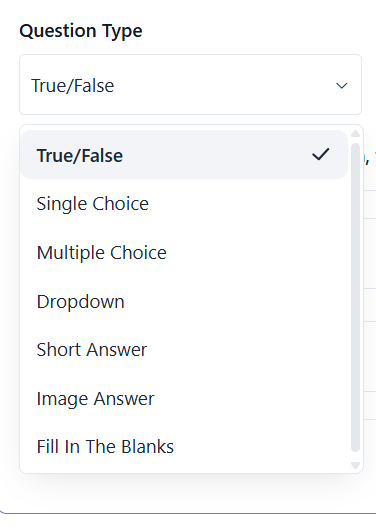
Step 5: Select a Question Type
Choose the question type you want to use.
For example, you can use a True/False question for a simple knowledge check or a Multiple Choice question when learners need to select one or more answers.
Step 6: Add Answers and Set Points
Depending on the selected question type, enter the available answers and define the correct answer or answers.
You can also assign points to the question.
Step 7: Add an Explanation
You can also provide an explanation for the question.
Explanations can help learners understand why an answer is correct or incorrect, making quizzes more useful as part of the learning process.
After configuring the questions, save your quiz and make it available to learners.
Now let’s look at the different question types you can use.
What About Quiz Matching Questions?
Quiz matching questions are another popular assessment format.
Matching questions typically ask learners to connect items from one list with the corresponding items in another list.
For example:
|
Concept |
Description |
|
HTML |
Structures web content |
|
CSS |
Styles web content |
|
JavaScript |
Adds interactivity |
Matching questions can be useful when you want learners to associate:
However, when planning an Academy LMS quiz, you should use the question types currently available in your Academy LMS setup rather than assuming every generic quiz format is supported.
If matching questions are not available as a native question type in your version, you can use another supported format to assess the same learning objective.
Reuse Questions With the Academy LMS Question Bank
Creating high-quality quiz questions takes time. If you frequently create quizzes for different courses or lessons, reusing existing questions can make your workflow more efficient.
Academy LMS includes a Question Bank that can help instructors manage and reuse quiz questions.
Instead of creating the same question repeatedly, you can organize your questions and use them when building quizzes.
A question bank can be especially useful when:
This can help reduce repetitive work and make quiz management easier as your LMS grows.
How to Choose the Right Quiz Question Type
Choosing the right question type depends on what you want learners to demonstrate.
|
Learning Objective |
Recommended Question Type |
|
Test a simple statement |
True/False |
|
Choose one correct answer |
Single Choice |
|
Identify multiple correct answers |
Multiple Choice |
|
Select an answer from a list |
Dropdown |
|
Recall a short answer |
Short Answer |
|
Identify something visually |
Image Answer |
|
Recall a missing term |
Fill in the Blanks |
For example, if you’re teaching HTML basics, you could use:
Using different formats throughout a course can make assessments more engaging and help evaluate different levels of understanding.
Conclusion
Choosing the right question format can make a significant difference in the effectiveness of your online assessments.
From True/False and Single Choice questions to Multiple Choice, Short Answer, Image Answer, and Fill in the Blanks, different question types allow instructors to evaluate different aspects of learner understanding.
A WordPress LMS such as Academy LMS gives course creators the tools they need to build interactive quizzes directly within their online courses.
The key is not simply to use as many question types as possible. Instead, choose the format that best matches your learning objective, keep your questions clear, and use explanations to help learners learn from their results.
With the right combination of quiz question types, you can create more engaging assessments and provide a better learning experience for your students.
Frequently Asked Questions
What are the most common types of quiz questions?
Common quiz question types include True/False, Single Choice, Multiple Choice, Dropdown, Short Answer, Image Answer, and Fill in the Blanks. The available formats depend on the LMS you use.
Can I create multiple-choice quiz questions in a WordPress LMS?
Yes. WordPress LMS platforms such as Academy LMS allow instructors to create multiple-choice questions. Depending on the question format, you can create questions with one or multiple correct answers.
How do I make True or False questions?
To create a True/False question, write a clear statement that can be objectively classified as true or false, then provide True and False as the available answers. In Academy LMS, you can select the True/False question type when creating a quiz question.
Can I create quiz questions with multiple correct answers?
Yes. You can use a Multiple Choice question format when a question requires learners to select more than one correct answer.
Can I create image-based quiz questions in WordPress?
Yes. If your WordPress LMS supports image-based questions, you can use images as part of the assessment. Academy LMS provides an Image Answer question type for creating visual questions.
Does a WordPress LMS support quiz matching questions?
Matching questions are a common quiz format, but support depends on the LMS. Before planning your assessment, check which question types are available in your LMS version. If a native matching question type isn’t available, you can often use another supported format to test the same concept.
Which quiz question type should I use?
Choose the question type based on your learning objective. Use True/False for simple statements, Single Choice for one correct answer, Multiple Choice for multiple correct answers, Short Answer for recall, Image Answer for visual identification, and Fill in the Blanks for missing terms.