
When students enroll in an online course, giving them access to every lesson immediately may not always be the best approach. Some courses work better when content is released gradually, giving learners time to focus, practice, and complete activities before moving forward.
This is where content drip becomes useful.
With a WordPress LMS, you can control when lessons, quizzes, assignments, and other course materials become available. You can release content on specific dates, after a set number of days from enrollment, after completing previous activities, or based on other learning conditions.
In this guide, we’ll explain what content drip is, how it works, when to use it, and how to configure it in Academy LMS.
What Is Content Drip?
Content drip is an LMS feature that releases course content gradually instead of making the entire curriculum available immediately.
For example:
Students receive access according to the schedule or conditions you configure. This can be useful when learners need time to study, practice, complete assignments, or understand one topic before continuing.
How Does Content Drip Work in a WordPress LMS?
The process is simple:
For example, one lesson might unlock seven days after enrollment, while another may unlock only after a previous activity is completed.
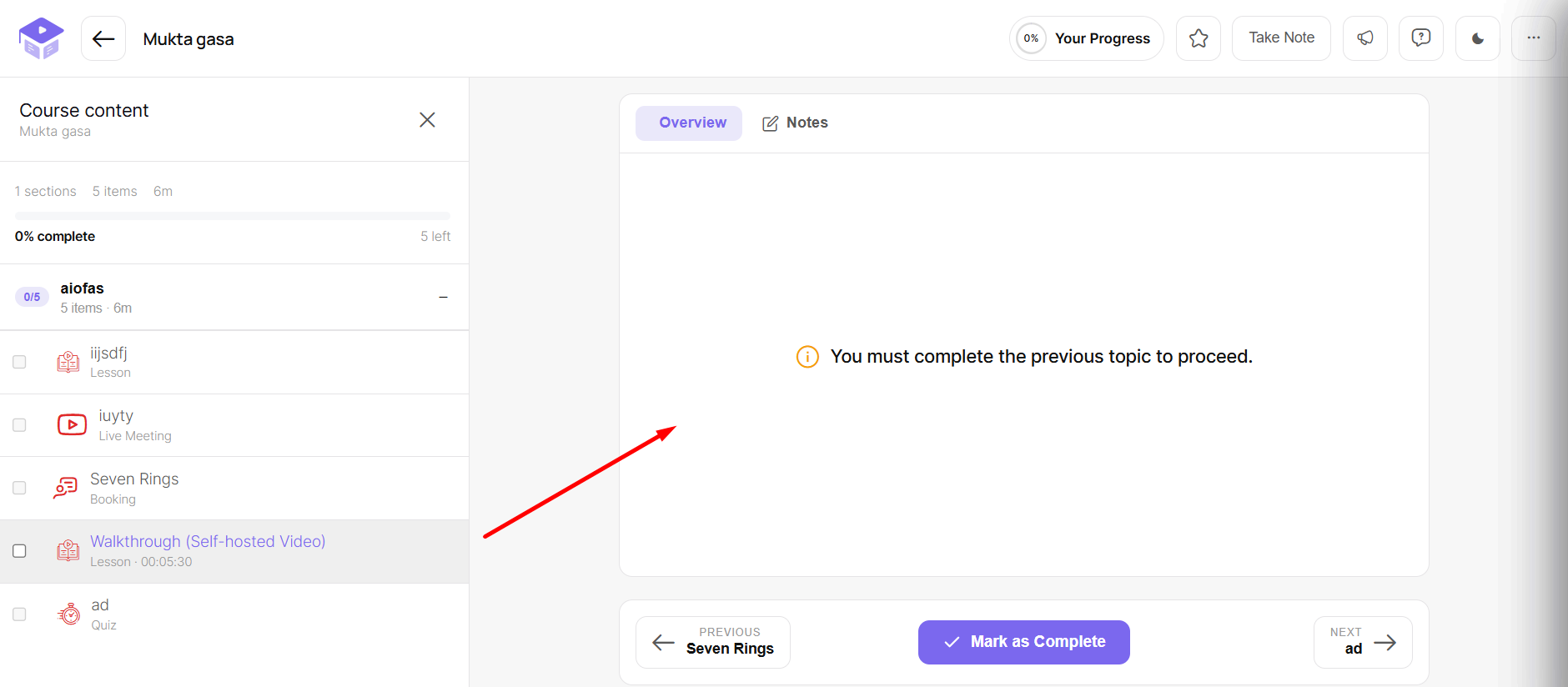
When content is locked, students should clearly understand what is available now, what comes next, and what they need to do before continuing.
How to Set Up Content Drip in Academy LMS: Step-by-Step
Academy LMS provides Content Drip as a Pro add-on for controlling the availability of lessons, quizzes, and assignments.
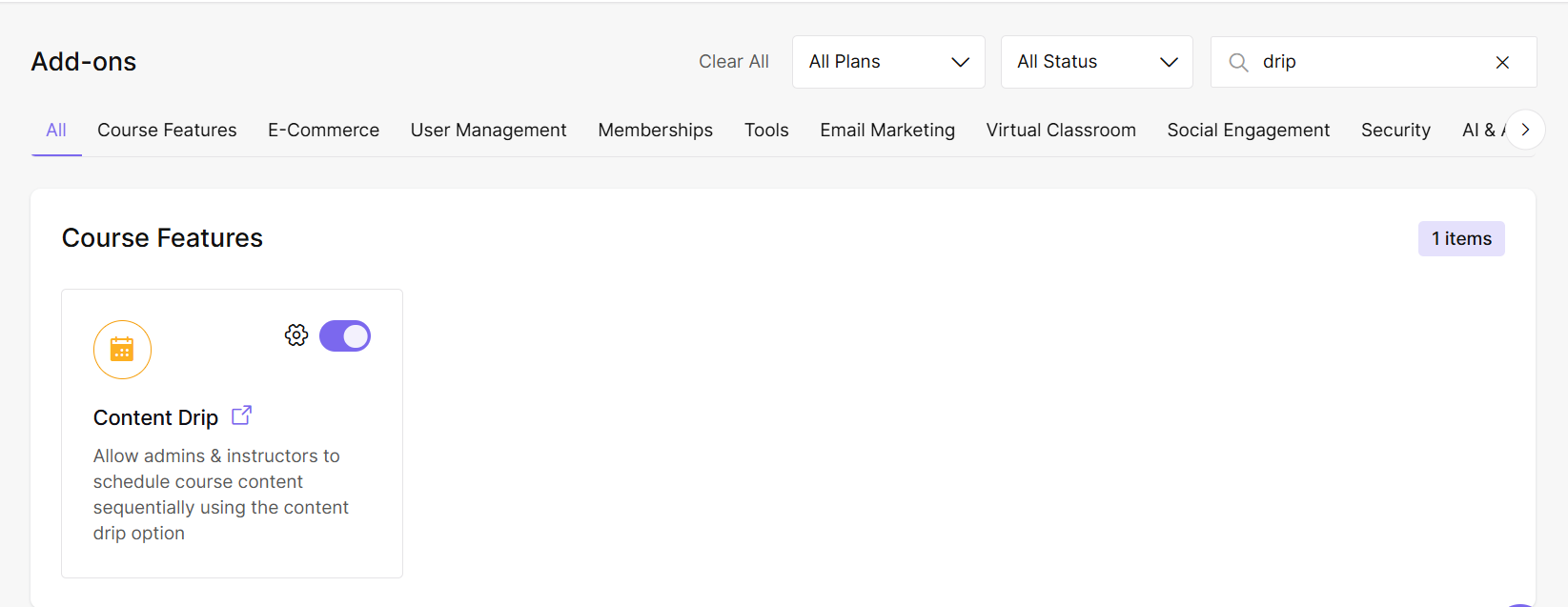
Step 1: Enable the Drip Content Add-on
Go to:
WordPress Dashboard → Academy LMS → Add-Ons
Find Drip Content and enable it.
Step 2: Enable Content Drip for Your Course
Open an existing course or create a new course.
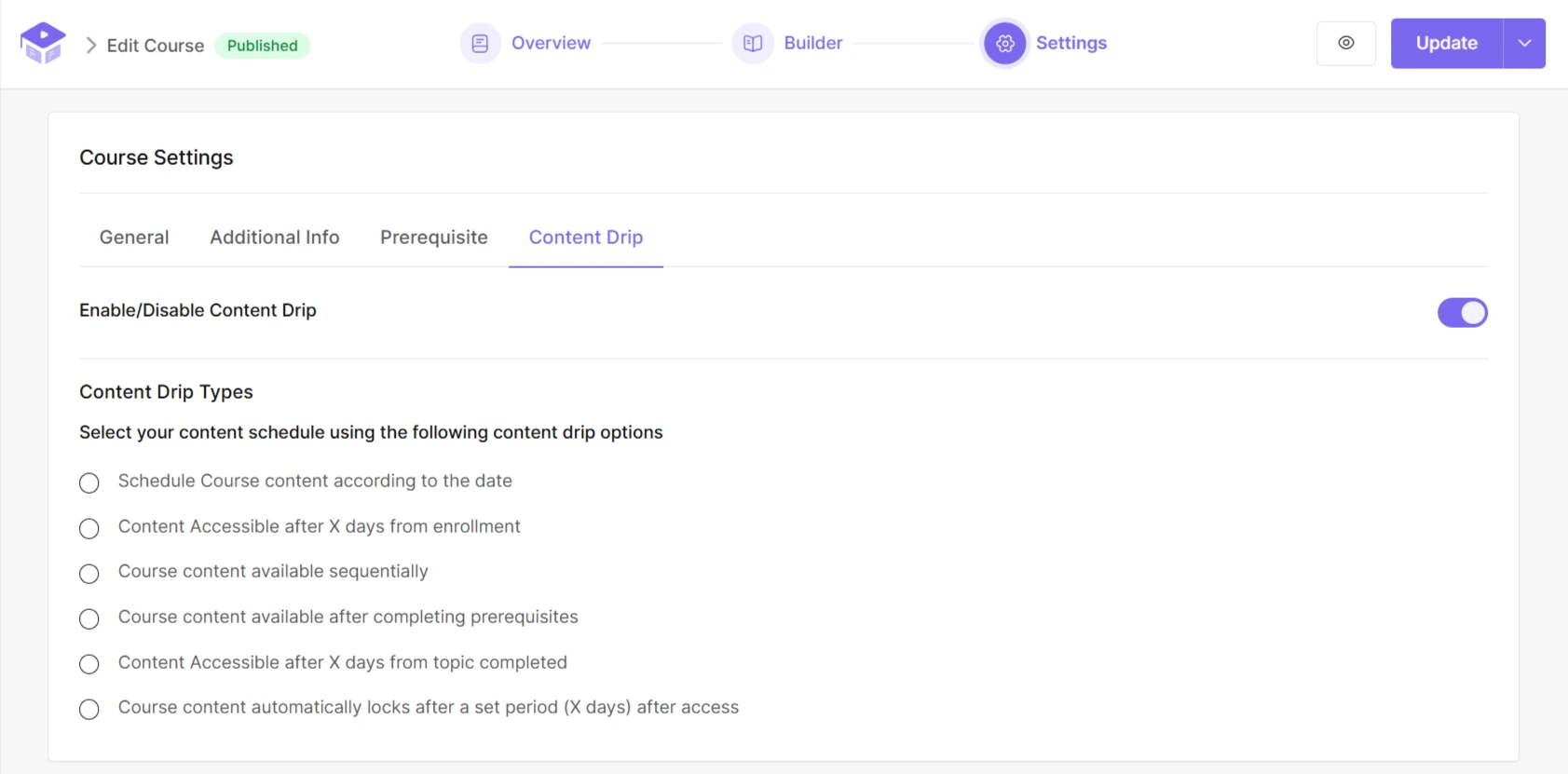
Go to the course settings and enable Content Drip.
Step 3: Choose Your Drip Method
Select one of the six available drip methods based on how you want learners to progress.
Because all six methods were already shown earlier, you don’t need to repeat another screenshot here unless the interface is different.
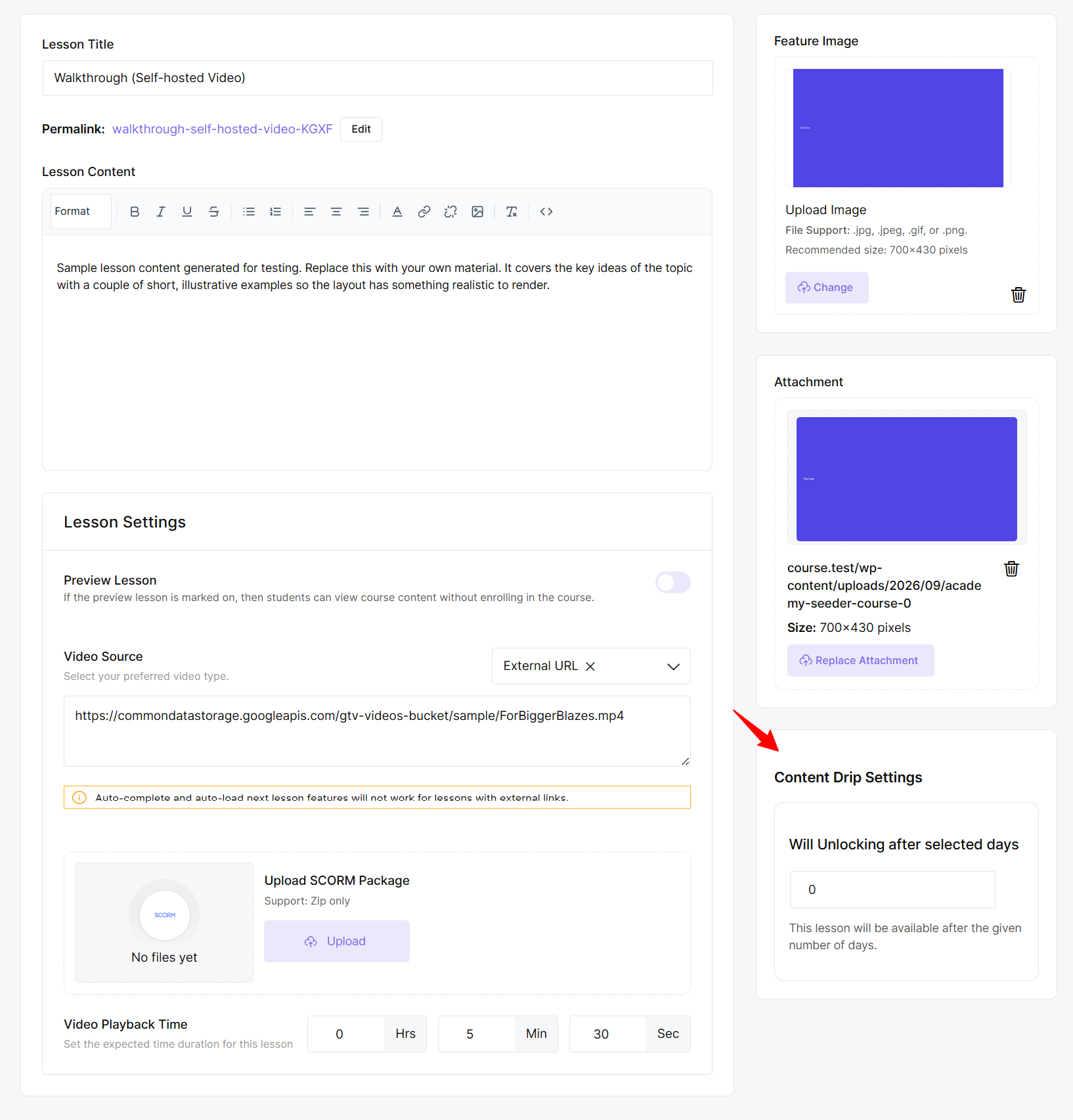
Step 4: Configure Content Drip for Lessons
Return to the course builder and open the lesson you want to control.
Using Academy LMS’s lesson management interface, configure the relevant unlock date, delay, prerequisite, or progression condition.
Save the lesson when you’re done.
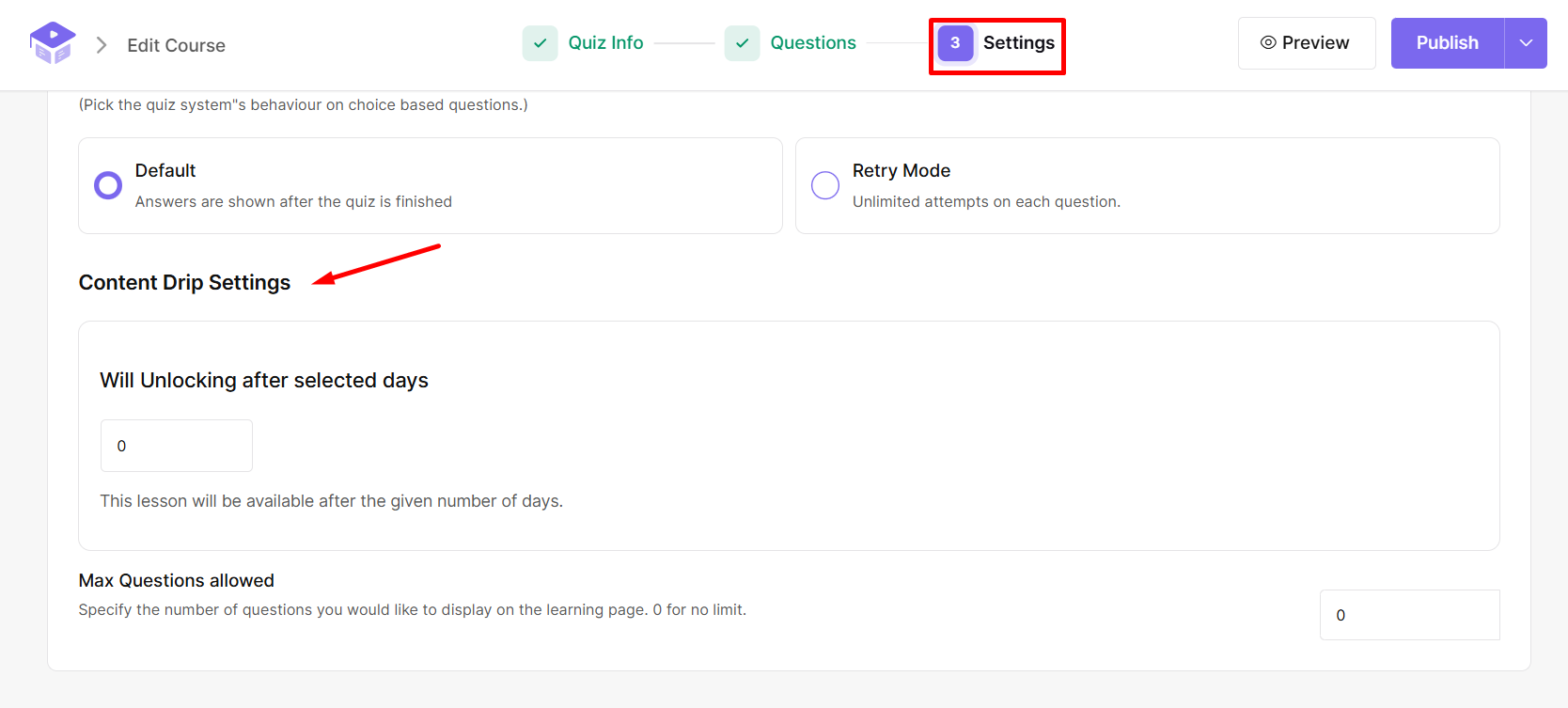
Step 5: Apply Content Drip to Quizzes
Open or create a quiz from the course builder. Configure the appropriate Content Drip condition and save your changes.
The quiz will become available according to the configured rule.
Step 6: Configure Assignments
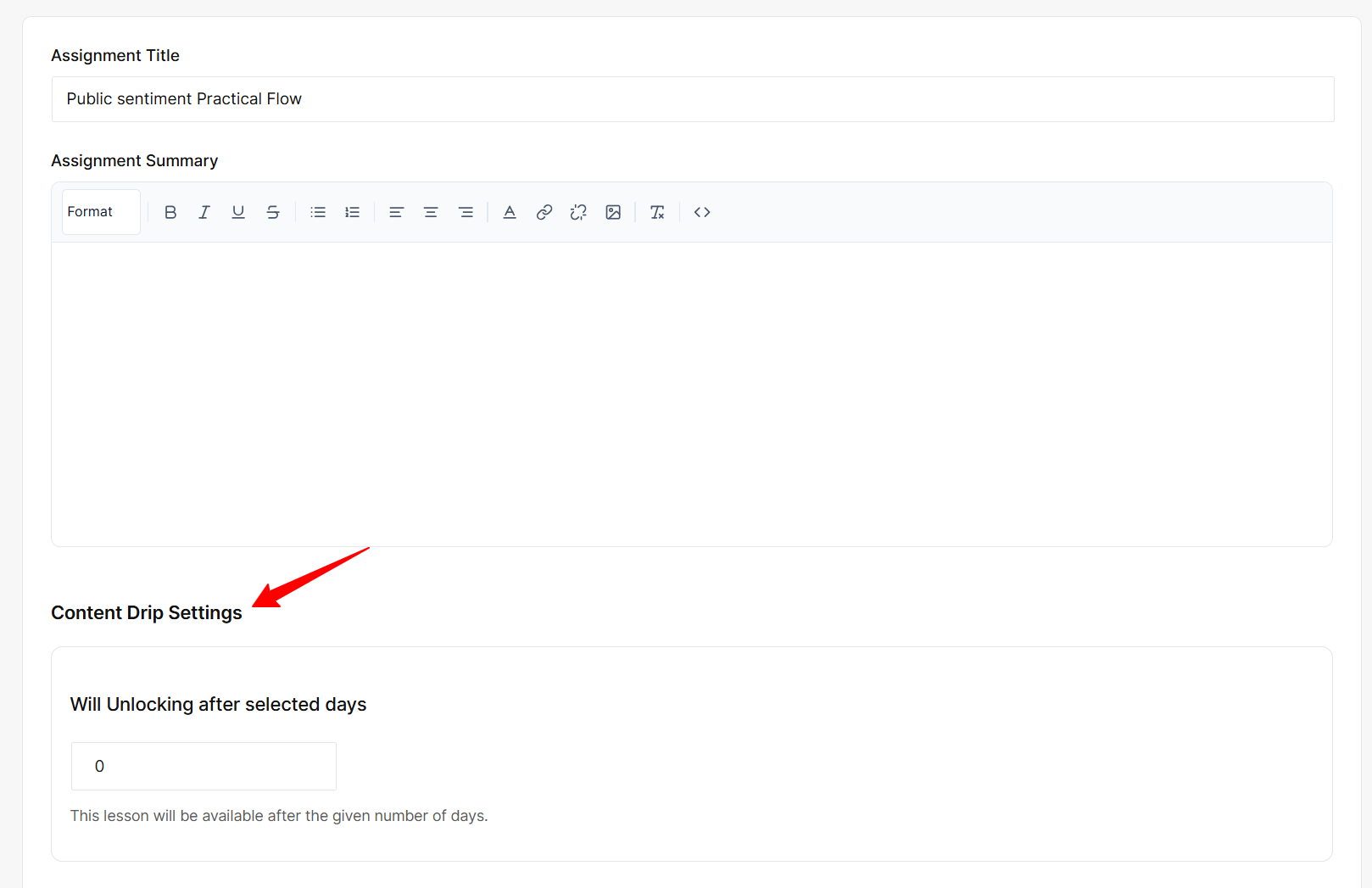
Assignments can also use drip conditions. Open the assignment, configure the appropriate access rule, and save it.
Step 7: Test the Student Experience
Before publishing, test the course from a student’s perspective.
Check that:
Why Use Content Drip for Online Courses?
Content drip is useful when controlling the learning pace adds value.
Prevent Information Overload
Releasing smaller amounts of content helps students focus instead of facing a large curriculum all at once.
Create a Structured Learning Path
You can guide learners through the course in a planned order, especially when later lessons depend on earlier topics.
Encourage Consistent Learning
Regular content releases give students a reason to return and continue progressing.
Give Students Time to Practice
A delay between lessons can give learners time to complete assignments, attempt quizzes, review material, or practice a skill.
Content Drip vs. Full Course Access
|
Content Drip |
Full Course Access |
|
Releases content gradually |
Makes all content available immediately |
|
Provides a structured pace |
Gives maximum flexibility |
|
Controls when content becomes available |
Students choose when to access content |
|
Useful for scheduled learning |
Useful for self-paced learning |
|
Can guide students through a sequence |
Allows free navigation |
Content drip works well when students should follow a controlled pace. Full access is often better for short courses, reference materials, or highly flexible self-paced learning.
Content Drip vs. Course Prerequisites
Content drip and prerequisites both control access, but they are used differently.
Content drip controls how or when content becomes available based on timing, progression, or other release rules.
Course prerequisites define requirements that learners need to satisfy before accessing another lesson, course, or activity.
For example:
Complete Lesson 1 → Access Lesson 2
A drip rule might instead be:
Enroll in course → Wait 7 days → Access Lesson 2
Both can be used together when your LMS supports that type of learning path.
What Are the Different Types of Content Drip in Academy LMS?
Academy LMS provides a Content Drip add-on with six methods for controlling access to lessons, quizzes, and assignments.
1. Schedule Course Content by Date
Set a specific calendar date for a lesson, quiz, or assignment.
For example:
This works well for cohort-based courses where students follow the same timeline.
2. Content Accessible After X Days From Enrollment
Release content a certain number of days after each learner enrolls.
For example:
This is useful for rolling enrollment because each student follows the same schedule from their own enrollment date.
3. Course Content Available Sequentially
Students move through the course in order. The next item becomes available after the previous learning activity is completed according to the configured progression behavior.
This works well for linear courses where each section builds on the previous one.
4. Course Content Available After Completing Prerequisites
Choose specific lessons, quizzes, or assignments that must be completed before later content becomes available.
For example:
Complete Lesson 3 → Unlock Lesson 5
Unlike strict sequential progression, you decide which activities act as requirements.
5. Content Accessible After X Days From Topic Completion
Start a countdown after a learner completes a particular topic.
For example:
Complete Topic 1 → Wait 3 days → Unlock Topic 2
This is useful when learners need time to practice or reflect before moving forward.
6. Content Automatically Locks After a Set Period
Instead of controlling when content opens, this option controls when it closes.
After the configured access period ends, the content can automatically lock again. This can be useful for challenges, cohort programs, or time-limited training.
Which Content Drip Method Should You Choose?
|
Course Requirement |
Recommended Method |
|
Same release date for all students |
Schedule by date |
|
Students enroll at different times |
X days after enrollment |
|
Lessons must be completed in order |
Sequential content |
|
Specific activities must be completed first |
Prerequisite-based drip |
|
Students need a gap after a topic |
X days after topic completion |
|
Content should remain available temporarily |
Automatic locking |
Choose the method that creates the simplest learning experience for your students.
Content Drip Use Cases and Examples
Multi-Week Course
30-Day Learning Challenge
Release smaller activities throughout the challenge instead of opening everything on day one.
Coaching or Training Program
You might release training material, assignments, feedback activities, and follow-up lessons on a weekly schedule.
Membership-Based Learning
Membership platforms can release new learning material regularly instead of making the complete library available immediately.
Courses With Practice and Assignments
You can add a delay between a lesson and the next activity when students need time to practice before moving forward.
When Should You Use Content Drip — and When Should You Avoid It?
Use content drip when your course benefits from:
Full access may be better for:
The goal is not to delay content just because the feature is available. Every restriction should have a clear learning purpose.
Common Content Drip Mistakes to Avoid
Using Drip Without a Learning Strategy
Don’t delay content simply because you can. Every restriction should support a learning goal.
Making Students Wait Too Long
Long delays can reduce motivation. Give learners enough time to practice without making progression unnecessarily slow.
Releasing Too Much Content at Once
Large releases can still overwhelm students. Keep each release manageable.
Not Explaining the Schedule
Students should know when content will unlock and whether they need to complete something first.
Forgetting About Students Who Fall Behind
Not every learner progresses at the same speed. Consider how your schedule affects students who need more time.
Final Thoughts
Content drip can help you create a more structured learning experience when controlling the pace of a course is important.
You can release content by date, enrollment time, sequence, prerequisites, topic completion, or limited access periods. The best method depends on how students should move through your curriculum.
With Academy LMS, you can apply Content Drip to lessons, quizzes, and assignments and choose the approach that best fits your course structure.
The goal is simple: use content drip only when it makes the learning experience clearer and easier for students to follow.
Frequently Asked Questions About Content Drip in WordPress LMS
How does content drip work?
Course creators configure when or under what conditions lessons, quizzes, assignments, or other activities become accessible. Students receive access when those conditions are met.
What are the benefits of content drip?
It can create a structured learning pace, reduce information overload, encourage consistent progress, and give learners time to practice.
Can content drip be based on enrollment?
Yes. Enrollment-based dripping releases content after a set number of days from each learner’s enrollment date.
Can I drip quizzes and assignments?
Yes. Academy LMS Content Drip can be applied to lessons, quizzes, and assignments.
How do I set up content drip in Academy LMS?
Enable the Content Drip add-on, activate it for your course, choose a drip method, configure the relevant conditions, save your changes, and test the student experience.