

Attendance tracking is essential for managing online courses, especially when students attend live classes or follow a cohort-based learning schedule. It helps instructors monitor student participation, identify frequent absences, and provide support to learners who may be falling behind.
However, managing class attendance manually can be time-consuming. Instructors may need to check meeting participants, update spreadsheets, and maintain attendance records separately. A reliable attendance tracking system simplifies this process by keeping student attendance organized and making participation easier to monitor.
In this guide, you’ll learn how to track attendance for live and cohort-based courses, explore effective attendance tracking methods, and discover how to manage student attendance using Academy LMS in WordPress.
What Is Attendance Tracking in an LMS?
Attendance tracking records whether students participate in scheduled classes, live sessions, or other learning activities.
In a learning management system (LMS), attendance records help instructors understand student participation throughout a course. Depending on the platform and its features, attendance may be recorded automatically, updated manually, or managed using a combination of both methods.
A typical attendance tracking system may help instructors:
For example, an instructor running a six-week WordPress development course can use attendance records to see which students consistently join live classes and which students miss several sessions.
Why Is Attendance Tracking Important for Live and Cohort-Based Courses?
Attendance management is especially useful when students learn together according to a fixed schedule.
1. Monitor Student Participation
Attendance records help instructors understand whether students are attending scheduled sessions. This is particularly important for courses that include live demonstrations, group discussions, or instructor-led activities.
2. Identify Students Who Need Support
Repeated absences may indicate that a student is struggling to keep up with the course schedule. Instructors can use attendance information to follow up and understand whether the student needs help.
3. Improve Cohort Management
Cohort-based courses typically follow a shared timeline. Students move through lessons, assignments, and live sessions together. Tracking attendance helps instructors maintain visibility across the cohort.
4. Maintain Consistent Records
A centralized attendance record reduces dependence on separate spreadsheets and scattered notes. Instructors can review student participation from one place instead of searching through multiple sources.
5. Support Better Course Planning
Attendance patterns can help instructors identify sessions with low participation. They can then review the class schedule, session format, or communication process to improve future attendance.
Important: Attendance is one indicator of participation, not a complete measure of learning. Students may learn through recordings, independent study, or other activities even when they cannot attend a live class.
Common Attendance Tracking Methods
Before setting up an attendance tracking system, consider how your courses are delivered and how much manual work your instructors can manage.
1. Manual Attendance Tracking
Instructors record attendance during or after each class. They may use a spreadsheet, a paper register, or an LMS attendance panel.
Best for: Small cohorts, in-person classes, and courses where instructors need to verify participation themselves.
Advantages:
Limitations:
2. Automated Attendance Tracking
An online attendance tracker may use supported activity signals to record participation automatically. The exact behavior depends on the LMS and the integrations being used.
For example, Academy LMS’s Attendance add-on can record attendance associated with online meeting links and lesson completion, depending on the lesson’s attendance settings. Administrators can also review and adjust student records when needed.
Best for: Scheduled online classes where instructors want to reduce repetitive attendance tasks.
Advantages:
Limitations:
3. Hybrid Attendance Tracking
A hybrid approach combines automated records with manual verification. The system collects available attendance information, and instructors review or correct the results.
Best for: Cohort-based programs, professional training, and courses with attendance requirements.
For many online learning programs, this approach offers a practical balance between efficiency and accuracy.
How to Track Attendance in Academy LMS
Academy LMS provides an Attendance add-on for managing student participation in online and offline classes. It includes a central attendance panel where administrators can review course attendance and manage individual student records.
To use this feature, you need the Academy LMS free plugin and Academy LMS Pro.
Step 1: Install and Activate Academy LMS
First, make sure Academy LMS is installed and activated on your WordPress website.
If you’re setting up an LMS website for the first time, make sure your courses and lessons are organized before configuring attendance.
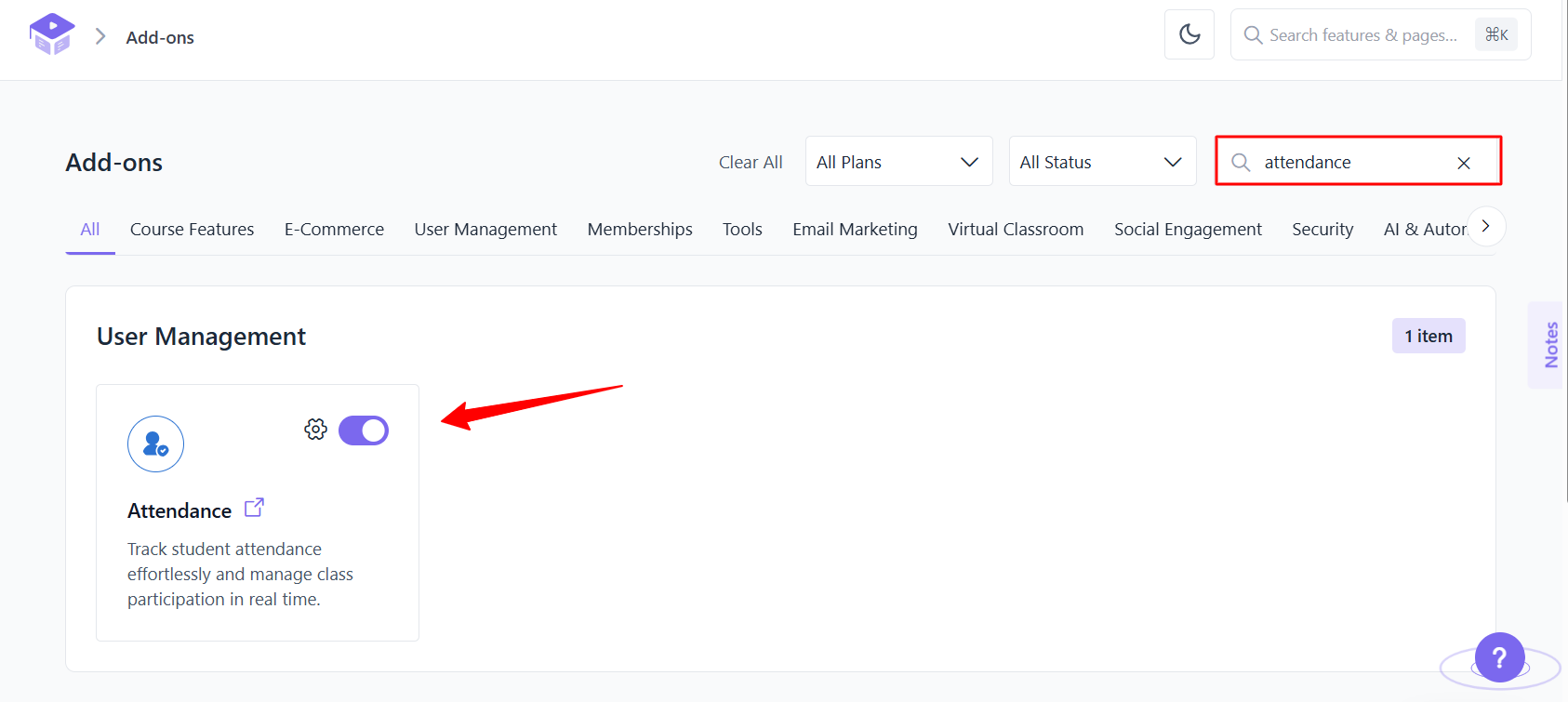
Step 2: Activate the Attendance Add-on
After activating Academy LMS and Academy LMS Pro:
Once enabled, the Attendance menu becomes available in the Academy LMS dashboard.
Step 3: Prepare Your Live Course
Create or open the course where you want to track student attendance.
For a cohort-based course, organize the curriculum around the live sessions students are expected to attend. For example, a WordPress development cohort might include:
You can create and organize your curriculum by following the Academy LMS course creation documentation.
Step 4: Configure Attendance for an Online Lesson
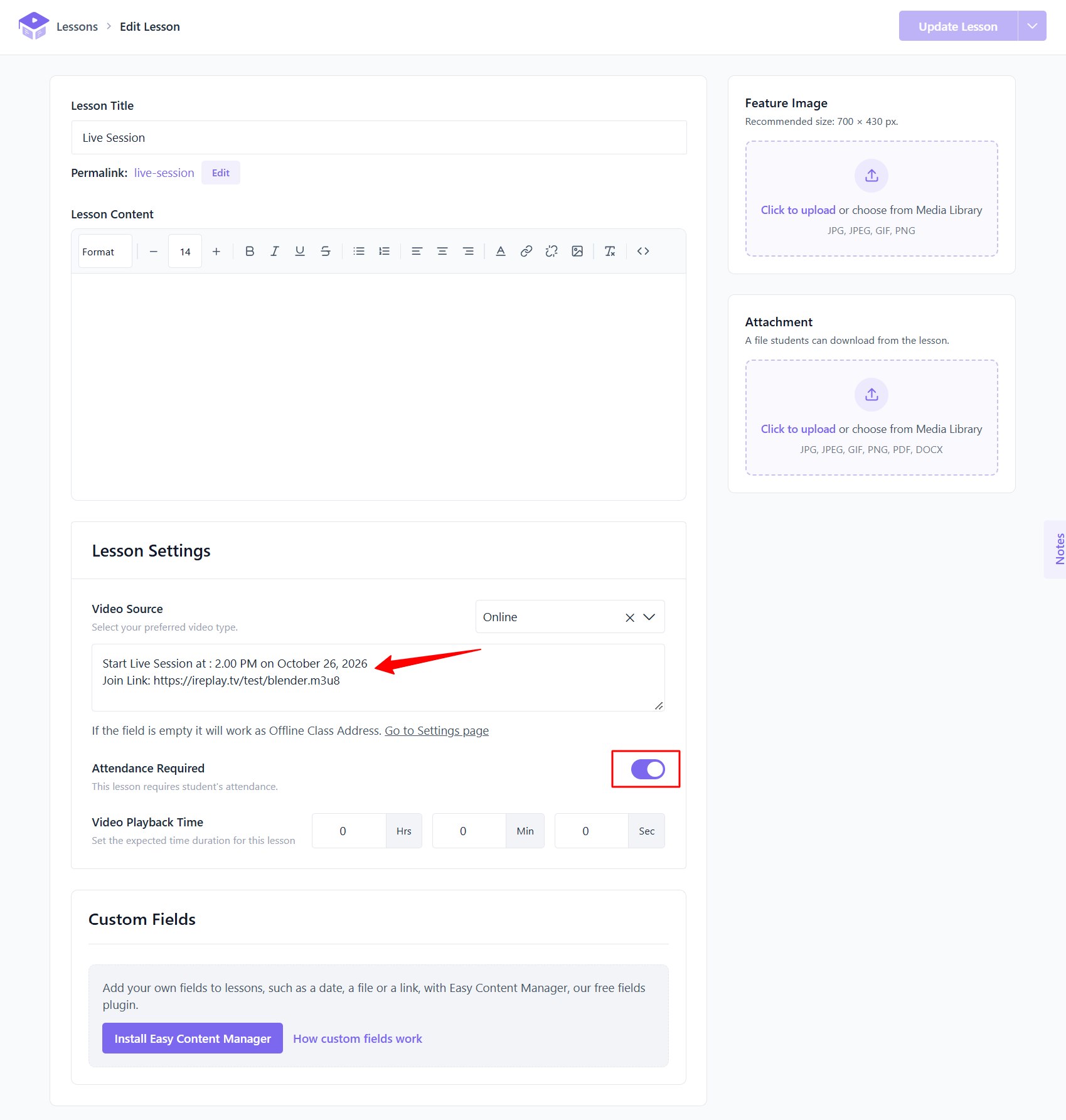
Open the lesson associated with your live class and review its settings.
According to the Academy LMS documentation, when Attendance Required is switched off, attendance can be recorded when students join through the meeting link and mark the lesson complete. When it is switched on, an administrator must manually mark the student as present.
This distinction is important. Choose the option that matches your institution’s attendance policy and verification requirements.
Step 5: Review Student Attendance Records
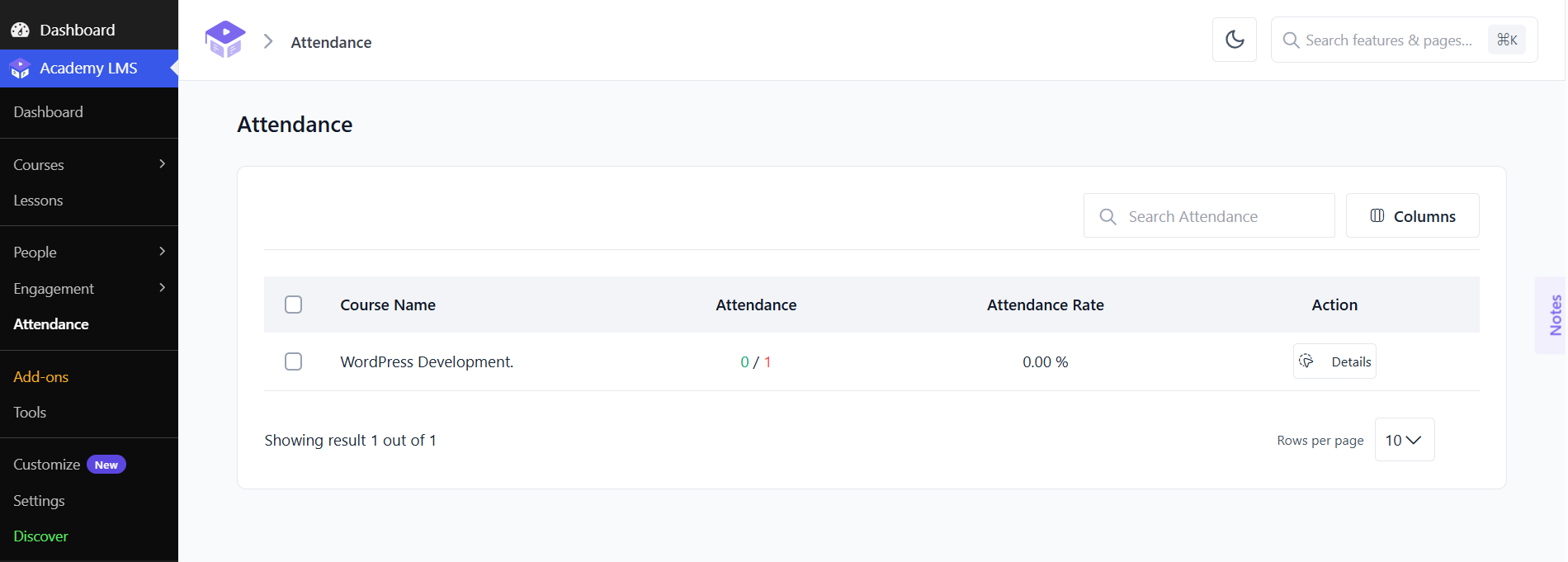
After configuring your lessons, go to Academy LMS → Attendance.
From this screen, administrators can review courses configured for attendance, check attendance counts and rates, and open individual course records.
Depending on the available records, you can:
Step 6: Verify Attendance After Each Live Session
After a live class, review the attendance records before relying on them for reporting or follow-up.
Check whether students who attended are recorded correctly. Review missing records and correct any mistakes. If your course requires verified attendance, make sure the instructor follows the agreed process for confirming participation.
For example, if 20 students are enrolled in a live session and 16 are recorded as present, the attendance rate is:
Attendance rate = (Students present ÷ Total students) × 100
In this example:
(16 ÷ 20) × 100 = 80%
Always define the denominator consistently. Depending on your reporting policy, it may refer to enrolled students, students expected to attend, or another clearly defined eligible group.
How to Track Attendance for Cohort-Based Courses
Live classes and cohort-based courses often require different attendance management practices. A live class may be a single event, while a cohort program can include many sessions over several weeks or months.
Use the following workflow to keep cohort attendance organized.
1. Create a Consistent Schedule
Decide which sessions require attendance tracking before the cohort begins.
For example, a six-week course might include two live sessions per week. Create a clear schedule and communicate the session times to students.
2. Define Your Attendance Policy
Explain what counts as present, absent, late, or excused, if your program uses those categories. Also clarify whether students must attend live sessions or whether an approved alternative is available.
Keep the policy consistent across instructors and cohorts.
3. Record Attendance for Every Session
Maintain a separate record for each session rather than relying only on a single overall course attendance figure.
This helps you identify students who miss particular classes and understand participation patterns over time.
4. Review Attendance Weekly
At the end of each week, check attendance records and identify students who have missed multiple sessions.
Follow up with those students to understand the reason for their absences and help them catch up when appropriate.
5. Keep Cohort Records Organized
Use consistent course names, session titles, and dates. This makes it easier to review historical attendance and compare participation across cohorts.
Where your LMS provides a centralized attendance panel, use it as the primary record instead of maintaining several competing spreadsheets.
Best Practices for an Effective Attendance Tracking System
Choosing an online attendance tracker is only one part of successful attendance management. The process surrounding the tool is just as important.
Set Clear Expectations
Tell students which sessions require attendance, how attendance is recorded, and what to do if they cannot attend.
Use a Consistent Verification Process
Do not assume that opening a meeting link means a student participated throughout the entire class. If full-session participation matters, define an appropriate verification method.
Review Incorrect or Missing Records
Automated systems can miss activity or produce incomplete records when students experience connectivity issues or use an unexpected access method. Review unusual records before taking action based on them.
Follow Up With Students Early
If a student misses several sessions, contact them before they fall too far behind. A supportive message can help identify scheduling conflicts, technical problems, or other barriers.
Protect Student Information
Limit access to attendance records to authorized instructors and administrators. Follow your organization’s privacy policies and retain attendance information only as long as necessary.
Use Attendance Alongside Other Learning Indicators
Attendance alone cannot show whether students understand the material. Consider it alongside assignment submissions, quiz results, and course progress.
For example, you can use Academy LMS Grade Book to manage student grades as part of a broader learner-progress review, rather than treating attendance as the only measure of success.
Common Attendance Tracking Challenges and Solutions
Challenge 1: Students Join Late
Solution: Define a late-arrival policy and explain how instructors should record late participation. Avoid treating every late arrival as a full absence unless that matches your published policy.
Challenge 2: Students Have Internet Problems
Solution: Establish a process for students to report connection issues. If appropriate, allow instructors to review the circumstances before finalizing attendance.
Challenge 3: Attendance Records Are Incomplete
Solution: Review records after each session and correct missing or inaccurate entries. Make sure instructors understand how meeting links and lesson completion affect attendance recording.
Challenge 4: Managing Multiple Cohorts Takes Too Much Time
Solution: Standardize course structures, session naming, and attendance policies. Use a centralized LMS attendance panel where available, and assign clear responsibilities to instructors.
Challenge 5: Attendance Data Does Not Reflect Learning Progress
Solution: Combine attendance reviews with other evidence of learning, such as assignment completion, assessment results, and course progress. Follow up with students based on their overall situation rather than attendance alone.
Conclusion
Attendance tracking helps instructors manage live classes, monitor cohort participation, and identify students who may need additional support. A consistent process makes attendance records easier to maintain and reduces the administrative work associated with scheduled learning.
For WordPress course creators, Academy LMS provides an Attendance add-on that supports online and offline attendance management. By configuring lesson settings, reviewing records after each session, and applying a clear attendance policy, you can create a more organized student attendance management system.
The most effective approach combines reliable records with instructor judgment and regular student follow-up. Use attendance data as one part of a broader strategy to support learner engagement and course completion.
Frequently Asked Questions
1. What is the best way to track attendance for online courses?
The best method depends on the course format. Automated tracking can reduce repetitive tasks, while manual verification helps instructors correct errors and confirm participation. For scheduled live classes, a combination of both can be effective.
2. Can I track student attendance in WordPress?
Yes. You can use a WordPress LMS with attendance management functionality. Academy LMS offers an Attendance add-on that supports attendance management for online and offline classes. The feature requires Academy LMS and Academy LMS Pro.
3. Does Academy LMS automatically track live class attendance?
Academy LMS can record attendance associated with online meeting links and lesson completion, depending on the lesson settings. When Attendance Required is enabled, an administrator must manually mark the student as present. Review the official Attendance add-on documentation for the setup details.
4. How do you calculate student attendance rates?
A common formula is: Attendance rate = (Number of students present ÷ Total eligible students) × 100 For example, if 18 out of 24 eligible students attend a class, the attendance rate is 75%. Make sure you define which students count in the total.
5. Is attendance tracking enough to measure student performance?
No. Attendance indicates participation in scheduled sessions, but it does not directly measure understanding or skill development. Combine attendance information with assessments, assignments, and course progress for a more complete picture.