
This is the one we’ve been waiting to show you.
Beta 1 rebuilt Academy’s admin, and we were proud of it — Tailwind from the ground up, dark mode everywhere, real pages instead of modals, a learn page we still enjoy demoing. Beta 2 does something we think is bigger. It opens Academy up to everyone else in your school.
A teacher can take the register from their own dashboard, enter marks, and open a roster with every guardian’s details on it. A parent can pull up a report card, check attendance, pay the fees and message the class teacher. A student can apply for two days off and watch the answer come back. Not one of them needs an admin login to do it.
That’s the release. Here’s what got us here.
Almost everything we rebuilt in Beta 1 was built for one person: whoever logs into wp-admin. And a school isn’t one person. So a class teacher takes the register on paper and walks it to the office. A parent phones the school to ask whether their son passed chemistry. A student asks for two days off for a wedding, somebody means to write it down, and the register says absent anyway.
Nobody in that story is doing anything wrong. The software is. Every one of those trips through the office exists for a single reason: Academy had exactly one real front door, and one person’s password behind it.
Beta 1 rebuilt the product for the person holding that password. Beta 2 is the release where everyone else got a door of their own.
A platform isn’t finished when the admin can do everything. It’s finished when nobody has to ask the admin.
Two things fall out of that. The first is a frontend dashboard that knows who’s looking at it. The second is that we deleted our own fees system and handed the job to StoreEngine — which, we’ll admit, is a strange thing to be proud of. We’ll get to why.
Where 4.0 got to
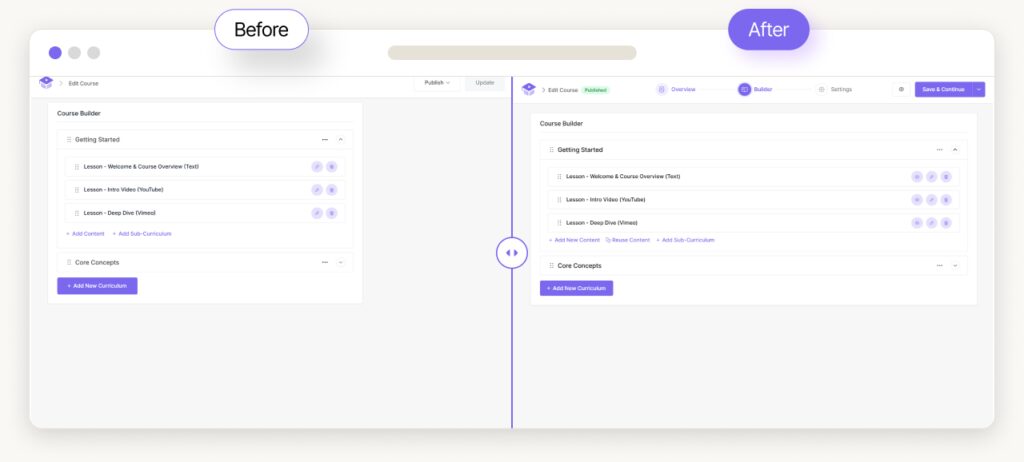
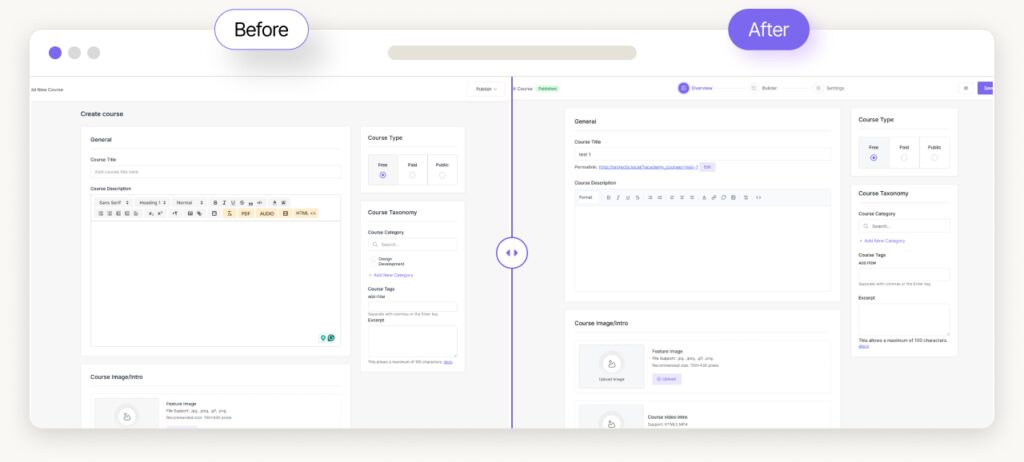
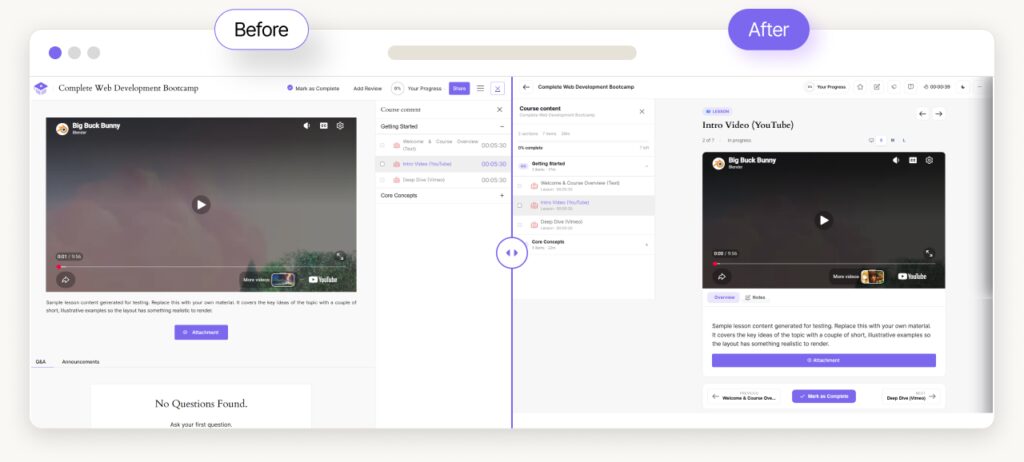
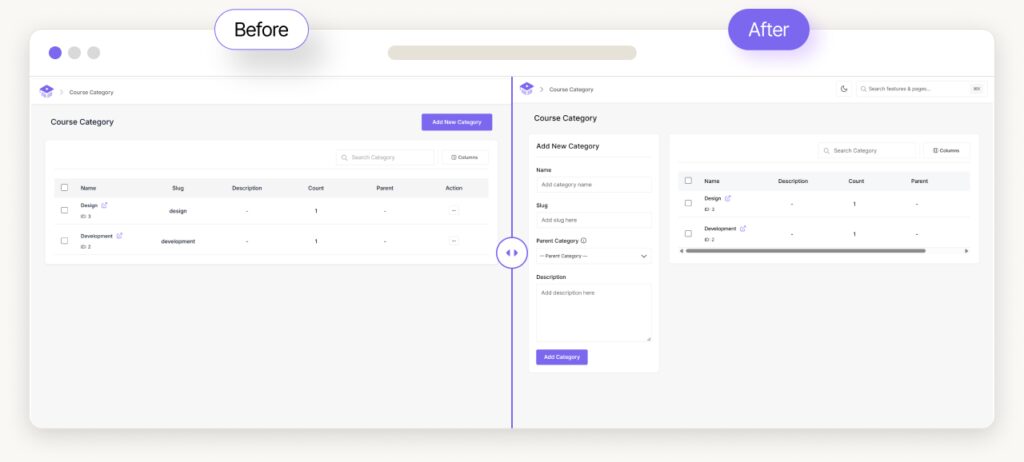
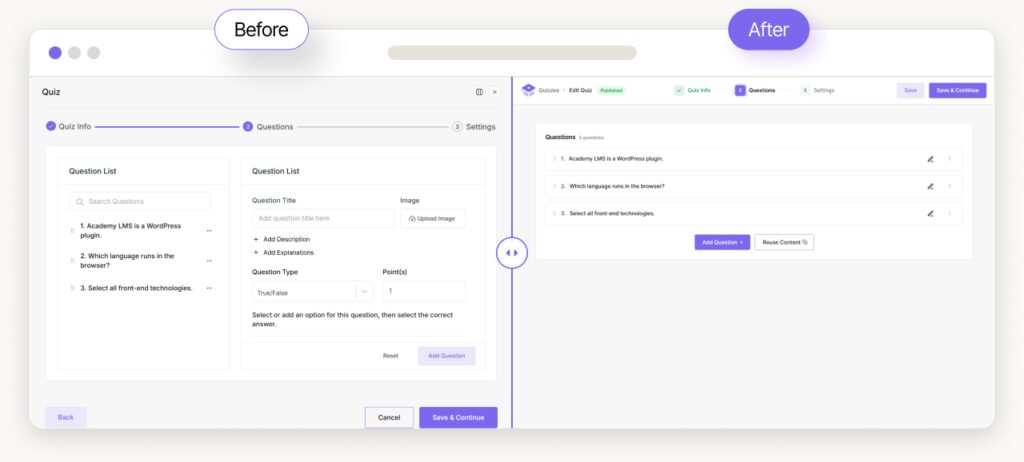
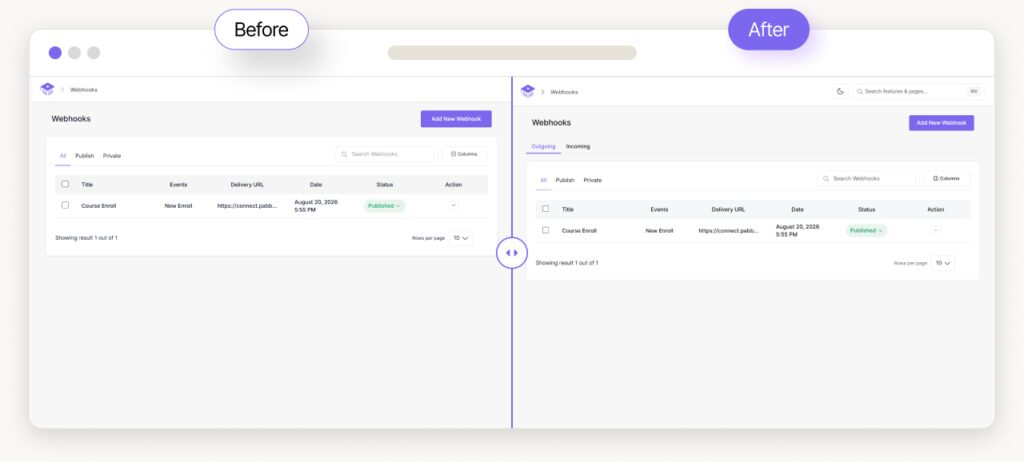
Before any of that, a look at what the 4.0 line has done to Academy’s screens. These changes landed across Beta 1 and Beta 2 — if you missed the first post, Academy LMS 4.0: The release where we rebuilt everything has the full story of the rebuild.
Part 01: One dashboard, three doors
The frontend dashboard used to be one long menu that grew every time we added a feature. Learners, instructors and guardians all walked into the same room and were expected to ignore the two-thirds of it that wasn’t theirs.
Now the dashboard is grouped into three areas — Learning, Teaching and Family — with a Viewing as switcher in the account menu.
- Instructors land on Teaching. Guardians land on Family. Learners land on Learning.
- Anyone with a single role never sees the switcher at all. If you’re only a student, there is nothing to switch between, and we don’t put a control in front of you to prove it.
- Each area gets its own dashboard landing. Teaching stands on its own numbers instead of appending them to the learner’s, and Family counts the children rather than the courses.
Underneath that is a small piece of plumbing we want to call out, because it’s the reason the rest of this release was possible: any dashboard item can now carry a submenu, and name its own index link.
That sounds like nothing. It’s the thing that killed tabs.
Before, if a feature had six screens, it got one menu item and six tabs crammed inside it. Tabs are what you build when the menu can’t hold structure. Now the menu can, so Digital Campus stopped inventing its own navigation and simply follows Learning / Teaching / Family like everything else. Campus doesn’t ask you who you are a second time — the dashboard already knows.
Small change, visible everywhere.
Part 02: The teacher finally has a desk
If you run a school on Academy, your teachers are the people touching the software most often and with the least patience for it. They have a class in front of them. They are not going to hunt through wp-admin.
So Teaching is now a real place on the frontend, and each of these is its own sub-page — no tabs, no modals:
THE TEACHING SIDE
- My routine — what you’re teaching, when, and where.
- Take attendance — the register for your section, marked in place.
- Enter marks — with decimal support, because 33.5 is a real mark and rounding it isn’t our call.
- My students — the class roster, each student showing their guardians and their monthly attendance, so the person who needs to make a phone call has the number in front of them.
- Behaviour notes — recorded against the student, visible to the family.
- Section notices — announcements to the class you actually teach, not the whole school.
- Leave — the answering side of the loop below.
The point of all of this is that a class teacher can do a full day’s administration without an admin account and without a single trip into wp-admin. That’s not a convenience feature. That’s the difference between a school adopting the software and a school keeping its paper register.
Part 03: A family that can see the school
The Family view is a menu, not a page of tabs. Report Card, Attendance, Class Routine, Exams, Fees, Facilities, Behaviour and Leave each get their own item — and the child you’re looking at follows you between them. Pick your son on the attendance page, click through to Fees, and you’re still looking at your son. It sounds obvious. It was not previously true.
Students get the same treatment from the other side: a student sees their own record as sub-pages of Campus — attendance, routine, exams, fees, and the facilities they use.
Leave applications: a small loop that proves the point
Of everything in this release, the feature we’d point at to explain what Beta 2 is about is the least impressive-sounding one.
A family applies for days off from their dashboard. They can watch the answer arrive, and withdraw an application the school hasn’t reached yet. The class teacher or the office answers it. And when it’s approved, those days get written into the attendance register as leave — not as absence.
That’s one workflow crossing three roles and landing in a fourth system. A parent starts it, a teacher answers it, a student is the subject of it, and the register is the thing that has to end up correct. Every one of those participants needed a door into the software before this could work at all. Beta 1 couldn’t have shipped it. That’s the whole story of this release in one feature.
Part 04: Parent–teacher messaging, and the half that was missing
Parent–teacher messaging now lives in Guardian, where it belongs. Conversations are threads per student and teacher, with unread counts and a teacher inbox. Campus contributes the section teachers a school’s families should be able to reach, so a parent doesn’t have to know the org chart to send a message about their child.
There’s an honest detail in here. Messaging existed in a form before this — but the teacher being written to had nowhere to read or reply. Half of a conversation is not a messaging feature; it’s a suggestion box. This release is where the other half got built.
You can turn the whole thing off: Settings → Advanced → Guardian, with a switch for Family Messages. Not every school wants an open channel between parents and teachers, and that’s a legitimate policy position, not a missing feature.
Part 05: Fees stop being ours
Here’s the part we said was strange to be proud of.
Digital Campus used to keep its own invoice ledger. We wrote it. It worked. In Beta 2 we retired it, and campus fees now run on StoreEngine instead:
- A fee plan becomes a product with a price. A monthly plan becomes a subscription. Checkout follows whichever e-commerce engine Academy is set to.
- The Fees screen is no longer a ledger of our own — it’s the school’s view of what StoreEngine already holds.
- You can see and choose the product a plan is sold as, with a checkout link to copy. Adopting a product that has already sold something never rewrites its price — we are not going to silently re-price a thing parents have already paid.
- You can collect a fee that has no plan at all, and see what each plan actually bills.
- Cash taken at the office records a paid order, so the office drawer and the online payments are the same ledger rather than two stories about the same money.
- Transport routes and hostel rooms bill their own riders.
Why do this? Because a school’s fees are not a special kind of money. They’re orders, invoices, subscriptions, refunds, tax, receipts and payment methods — and a commerce engine has spent years getting all of that right. Every hour we spent maintaining a parallel, worse version of StoreEngine inside Campus was an hour not spent on attendance, exams or report cards.
In Beta 1 we wrote that fragmentation is the enemy and depth is the moat. It would be easy to read that as build everything yourself. It isn’t. It means build it once, in the right place, and let the rest of the platform use it. The best code we wrote this cycle is the code we deleted.
The same instinct shows up in the smaller decisions: e-commerce and messaging are now configured in Academy, not separately in Campus. One setting, one place, however many plugins are reading it.
Part 06: The campus grew up
Digital Campus shipped in Beta 1 as a genuinely new idea — a school information system that lives in the same product as the online courses. Beta 2 is where it stopped being new and started being usable at scale.
STRUCTURE & RECORDS
- A campus is now a post type with a public page, its own editing screen, and content written in the block editor. Your campus has a page on your site, and you write it the way you write anything else in WordPress.
- Subjects reworked into a shared Bank plus per-class assignment. A student detail page replaces the old Parents and Subjects menus.
- Class-level daily attendance, for schools that don’t split classes into sections. Not every school has sections, and one that doesn’t shouldn’t be locked out of taking a register.
- A Semester dimension, with per-class and department/year analytics.
EXAMS & TIMETABLE
- Exam scheduling and admit cards overhauled: schedule inline from the exam form, an inline Schedule column, per-section admit cards, invigilators, and a per-exam schedule summary.
- Decimal marks in result entry, and exam total and pass marks that accept decimals.
- A bell schedule with period start/end times and named breaks — lunch, recess. A timetable that doesn’t know when lunch is isn’t a timetable.
- The Timetable Builder now cascades Department → Class → Section, with first-run setup and sane handling when a class has no sections.
FACILITIES
- A proper sidebar for facilities and per-facility on/off switches — carry the modules you use, not the ones you don’t.
- List paging and search across the board, plus per-campus scoping.
- Transport gains stops and pickup points, vehicle type, seats, status and documents. Hostel gains blocks with occupancy guards. Library gains its own category register.
- Delete guards that refuse to remove something still referenced by something else.
- We removed the Inventory facility. It duplicated what a school already tracks elsewhere, and a half-hearted asset register is worse than none.
SETTINGS & ADMIN
- Settings becomes General, Addons and Tools, and presets apply directly without walking the full wizard.
- The Campus admin now follows Academy’s own patterns — list controls beside the heading, tables that show their count, column control and paging — and the Campus menu sits directly under Academy LMS instead of off on its own.
- The admission form’s Save rides in the sticky topbar instead of hiding at the bottom of a very long form.
Part 07: And the core got sharper
Academy itself didn’t sit still while all of that happened.
ADDED
- Quiz question difficulty level, so a question bank can be weighted rather than just shuffled.
- Quiz attempt protection.
- Pro badges and teasers across the admin, so Pro-only features are marked before you click them. Finding out something is Pro after you’ve committed to using it is a bad experience, and we’d rather be upfront.
- Extensions & Integrations entries for Easy Content Manager, Board and App Builder, with new addon icons.
IMPROVED
- Received Reviews is now a real menu item for instructors. It was registered but never shown — meaning an instructor literally could not reach their own reviews. And the learner’s “Reviews” is now “My Reviews,” so the two stop reading as the same page.
- Dark mode contrast across the dashboard, the learn page and settings. We shipped dark mode in Beta 1; this is the pass where it stopped having soft spots.
- Settings got another round: addons filter, advanced teaser, icon colours, overview tab and select controls, plus the Webhooks and Discover screens.
- Updated licensing SDK.
The fixes nobody notices until they break
Extracting Digital Campus into its own plugin left debris — autoload failures, PHP notices and menu redirects — and we cleaned all of it up. Beyond that: quizzes with a save button stuck disabled, permission checks, question images and bulk actions; course archive settings not applying; the Course Bundle addon and menu visibility; parent category select; a type-casting error; assignment, meeting and booking rendering; the Course Active Timer that couldn’t be disabled; the learn page theme toggle, lesson prev/next spacing and Q&A layout; Pro gating on certificates, course type and quiz-attempt export; and documentation links pointing at the wrong URL.
Two are worth telling properly, because they’re the kind of bug that teaches you something about your own architecture.
The marks input you couldn’t type into. A stale closure in the shared table meant the cell captured its state on first render and then quietly ignored you. Everything looked right and nothing worked. If you’ve ever typed a number into a field and watched it refuse to appear, you know exactly how much confidence that costs.
Guardian’s route flush. Academy builds its dashboard rewrite rules from the menu — and the menu is capability-dependent. So a flush that landed on an anonymous front-end request wrote out a set of rules with every instructor-only endpoint missing, and those pages 404’d until something flushed again from a privileged context. Intermittent, invisible in testing, maddening in production. The fix is that Guardian’s flush only runs from wp-admin.
Neither of these makes a headline. Both of them are the difference between software you tolerate and software you trust.
Why this release looks like this
Beta 1 was a rebuild you could see. Beta 2 is mostly a rebuild you can only see if you’re not the administrator — which is the harder kind to justify and the more important kind to do.
Here’s the conviction underneath it. Every serious learning business has more than one kind of person in it. The moment your platform only has one real front door, everybody else’s work gets routed through whoever holds the admin password. The teacher emails the office to record attendance. The office types it in. The parent phones the office to ask about a report card. The office reads it out. The software isn’t running the school at that point — one exhausted administrator is, and the software is just where they keep things.
Multiply that by three hundred students and it’s why institutions end up back on paper.
So Beta 2 built doors. A teacher’s door, a family’s door, a student’s door — each one showing only what that person is responsible for, each one reachable without an admin account. And where a job already had a good home elsewhere in the ecosystem, we moved it there instead of maintaining our own worse copy. That’s the fees decision, and we expect it won’t be the last one of its kind.
Still to come
We’ll keep being straight with you about this. In the Beta 1 post we said Beta 2 would bring deeper behavioral automation, more of the native engagement stack, richer assessment and tighter ecosystem integrations.
Two of those landed properly. Ecosystem integration is the strongest thread in this release — fees on StoreEngine, e-commerce and messaging configured centrally, and new Extensions entries. Engagement advanced with parent–teacher messaging, section notices and behaviour notes. Assessment moved, but incrementally: difficulty levels, attempt protection, decimal marks and the exam scheduling overhaul.
Deeper behavioral automation is the one that didn’t make this build. It’s still coming, and we’d rather say that plainly than let it quietly disappear from the roadmap between two blog posts.
This is still a beta — and it’s getting closer
4.0 Beta 2 is bigger than most releases we’ve ever shipped, and it’s still a beta. Back up your site, spin up a staging copy, update, and go poke around — and this time, log in as somebody who isn’t you. Sign in as a teacher. Sign in as a parent. That’s where this release lives.
If you’re running Digital Campus and you’ve been using the old invoice ledger, read the fees section above before you update. Fees now live in StoreEngine, and you’ll want to understand how your plans map onto products before you’re taking real payments through it.
Tell us what breaks. Tell us what finally works the way you always expected it to. And tell us which door is still missing — because after this cycle, we’re fairly convinced that’s the question that matters most.
Thank you, as always, for building your courses, your schools and your businesses with us.