
Most eLearning courses don’t get finished. Online learning research from Mirasee shows tech course completion rates average just 34%. That means roughly two out of every three learners who start a course quit before the end.
The problem is rarely the learner. It’s the course design. A well-structured learning management system with the right course architecture can push completion rates well above 65%. The courses that achieve this avoid a specific set of mistakes most instructors repeat without realizing it.
This article breaks down 9 of the most common eLearning mistakes, why each one happens, and the exact fix for each. Knowing why online learning works when done right starts with understanding what breaks it.
Quick Answer: What are the most common eLearning mistakes?
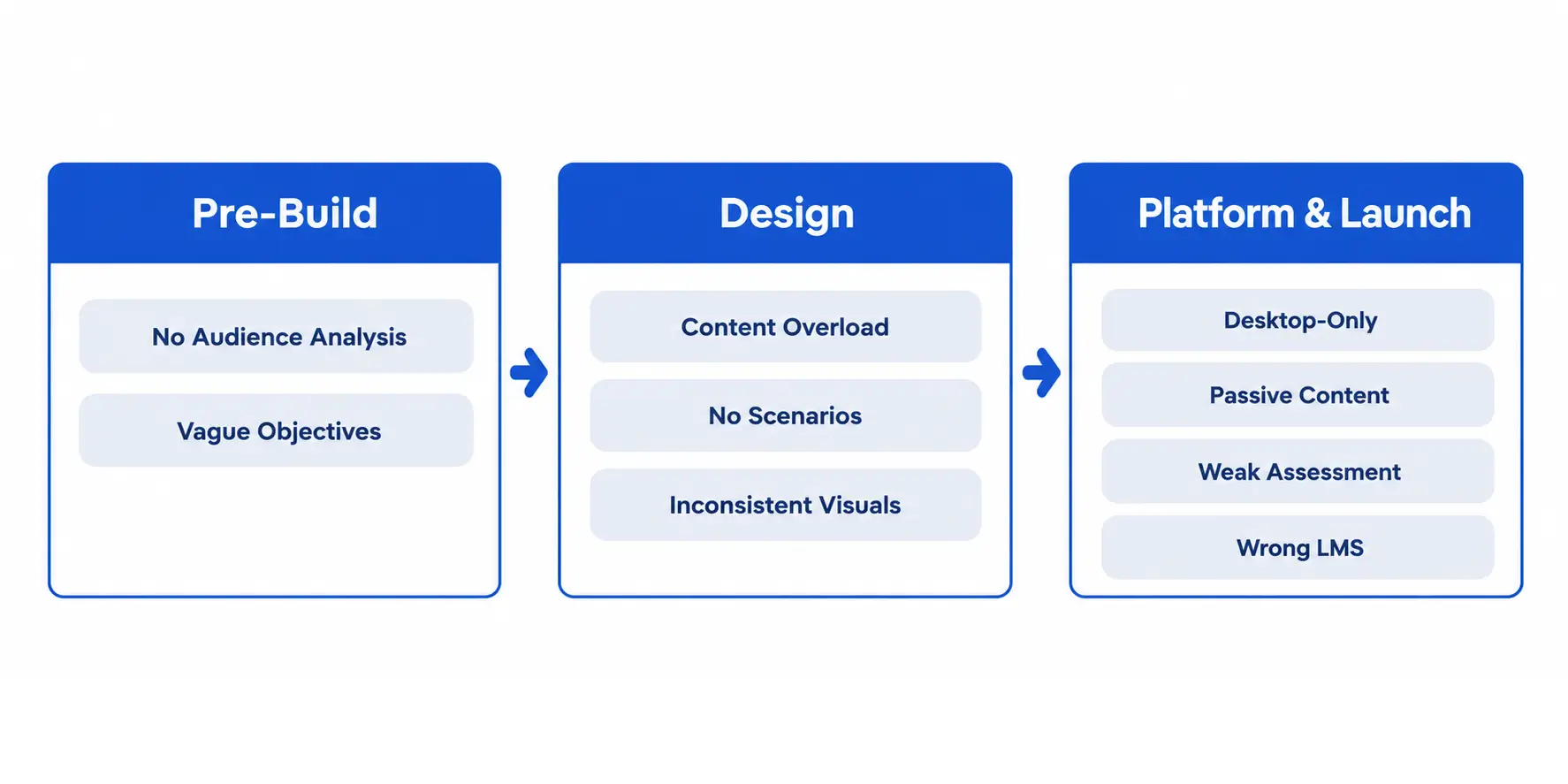
What Most eLearning Courses Get Wrong Before They Launch
The most expensive mistakes happen before a single slide is built. Decisions made during planning shape everything downstream. Most instructors skip past them to get to the content faster.
Skipping Audience Analysis
Audience analysis is finding out exactly who will take the course, what they already know, and what problem they need to solve.
Courses built without this end up teaching things learners already know or skipping things they actually need. Both outcomes cause early dropout.
The fix is specific: interview at least five people who match your target learner before writing any course content. Ask what they struggle with, what they’ve already tried, and what success looks like to them. Their answers shape every module.
Writing Objectives Nobody Can Measure
A learning objective is a statement of what the learner will be able to do after the course, described in measurable terms.
Weak objectives sound like: “Understand the basics of project management.” Strong objectives sound like: “Create a project timeline using the Work Breakdown Structure method.”
The difference matters because your objectives drive assessment design. If you can’t test for it, the objective is too vague. Rewrite every objective using action verbs from Bloom’s Taxonomy: analyze, apply, build, evaluate, create.
The Content Design Mistakes That Lose Learners
I’ve seen well-researched courses with excellent instructors fail at this stage. The content structure was working against how people actually retain information.
Overloading Every Lesson With Information
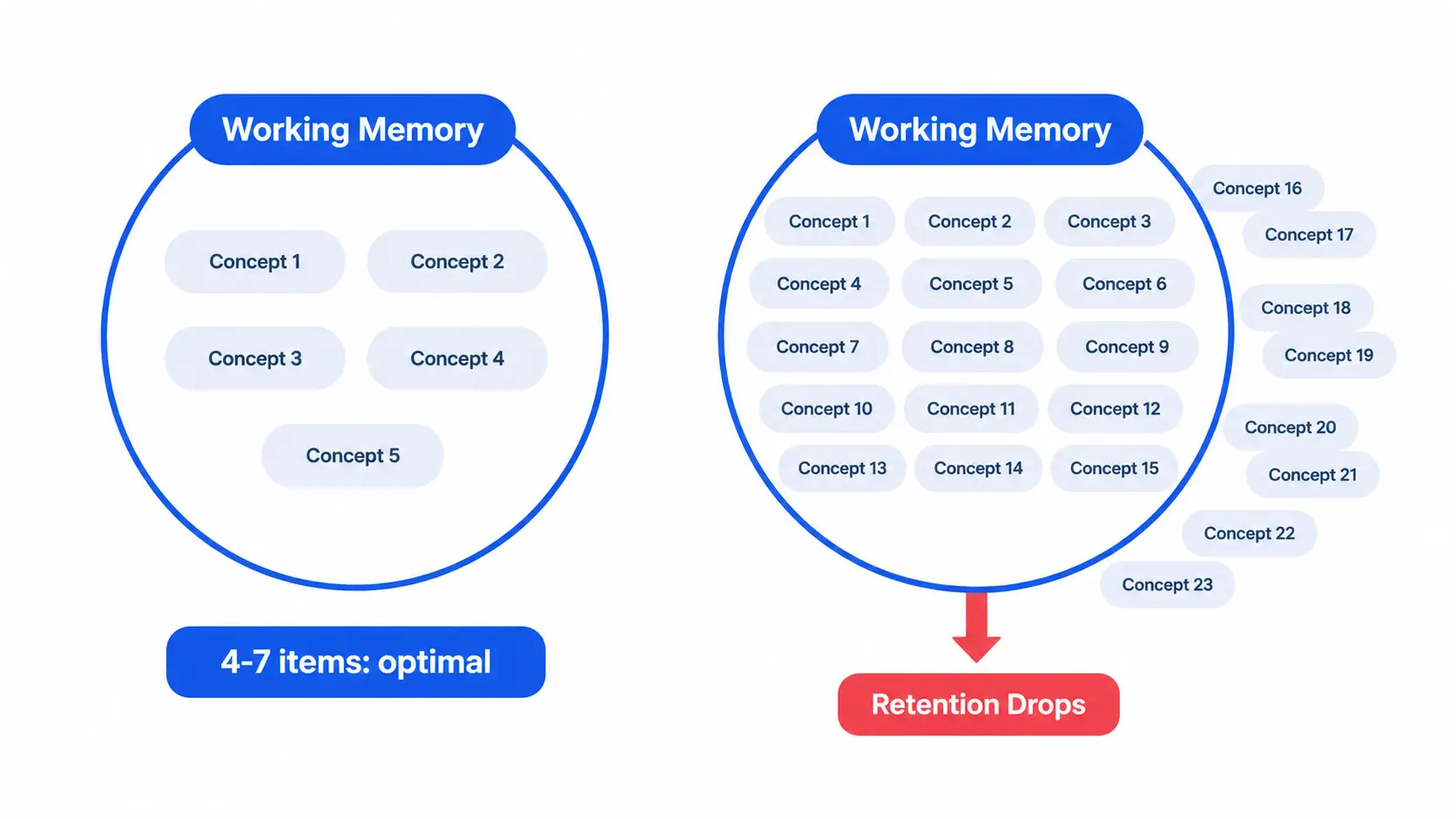
Human working memory holds roughly 4-7 items at a time, according to cognitive load theory (Miller, 1956). Pack more than that into one lesson and learners stop retaining anything.
Most eLearning courses push 20 or more concepts per module. That’s not deep learning. It’s information dumping.
eLearning engagement data from Wooclap shows microlearning increases engagement by 50% compared to longer formats. Shorter lessons with one core idea each outperform dense modules consistently.
The fix: cap each lesson at one primary concept. If a topic needs more depth, split it across two lessons.
Ignoring Real-World Scenarios
Telling learners a concept is not the same as teaching them to use it.
A customer service course that lists “active listening” as a skill but never puts the learner in a real situation is wasted training. They’ll recognize the term and forget it within a week.
Every skill-based lesson needs a scenario where the learner makes a decision and sees a consequence. That’s the difference between information and applied knowledge.
Building a Course Nobody Can Navigate
Poor Visual Structure and Inconsistent Design
Visual structure is how the learner understands where they are, where they’re going, and what matters most on any given screen.
Courses that use three different font sizes, inconsistent button placement, and no visual hierarchy make learners work harder to absorb the same content. That cognitive friction adds up and causes fatigue.
The fix: build a simple design guide before you touch the authoring tool. Set one font pairing, a three-color palette, consistent button placement, and a rule about when to use each layout type. Apply it to every slide without exception.
Designing for Desktop When Learners Are on Mobile
67% of US college students use mobile devices for coursework (Mirasee, 2024). Most eLearning courses are still built on desktop-first assumptions.
This is not a minor formatting issue. Tiny buttons, text that requires zooming, and video players that don’t scale are all dropout triggers.
Test every module on a phone before publishing. If anything requires pinching or horizontal scrolling, redesign it. The top eLearning trends for 2026 make clear that mobile is the primary design target now, not an afterthought.
The Engagement Mistakes That Cause Dropouts
Engagement is the variable most course creators underestimate. The mistake I see most often is a course packed with content and completely empty of interaction.
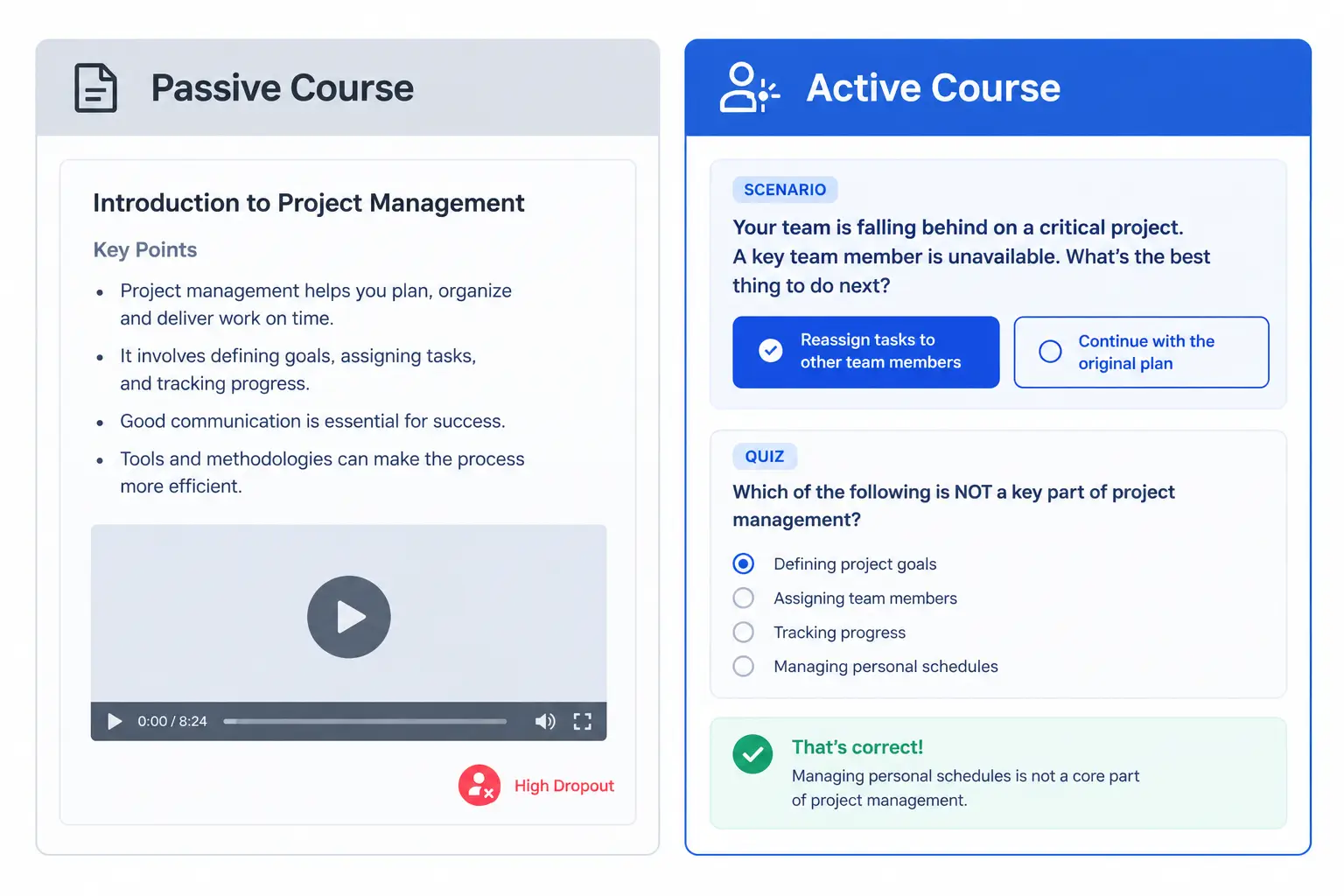
A 40-minute lecture video with no pause points, no quiz questions, and no branching decisions is the fastest way to lose someone midway through module two.
Social learning increases completion by 75% (Mirasee, 2024). Discussion boards, peer feedback, and cohort checkpoints convert passive watchers into active learners. Gamification adds to this: 67.7% of students report gamified courses as more motivating (Journal of Education for Business, 2018).
The fix is concrete: add at least one interaction point every five minutes of content. A quiz question, a reflection prompt, a branching scenario choice, or a discussion thread all count.
Assessment and Feedback Mistakes That Ruin Learning Outcomes
Assessment is where most instructors take the shortcut that breaks everything else.
A quiz at the end of a module that asks “What did we cover today?” is not assessment. It’s a checklist. Real assessment forces learners to retrieve information under conditions that resemble real use.
The two most common mistakes here are recall-only questions with no real-world application, and feedback that only tells learners they were wrong without explaining why.
Academy LMS handles this with built-in assessment tools designed for applied learning. The Academy LMS quiz builder supports multiple question types including scenario-based and multi-select questions, so instructors can test application rather than just memory.
Feedback must be immediate and specific. “That’s incorrect” teaches nothing. “That’s incorrect because X happens before Y in this process” gives the learner the reasoning behind the right answer.
Choosing the Wrong LMS for Your Course
The common advice here is wrong. Most sources tell instructors to start with the cheapest option and upgrade later. That approach usually means rebuilding the course from scratch when the platform can’t handle your requirements.
An LMS that can’t support your course structure forces you to compromise the design. Video courses on platforms that throttle playback quality lose learners. Courses with complex branching paths built on platforms that only support linear navigation simply don’t work.
Before choosing a platform, define five non-negotiable requirements: assessment type, media support, mobile behavior, reporting depth, and pricing model.
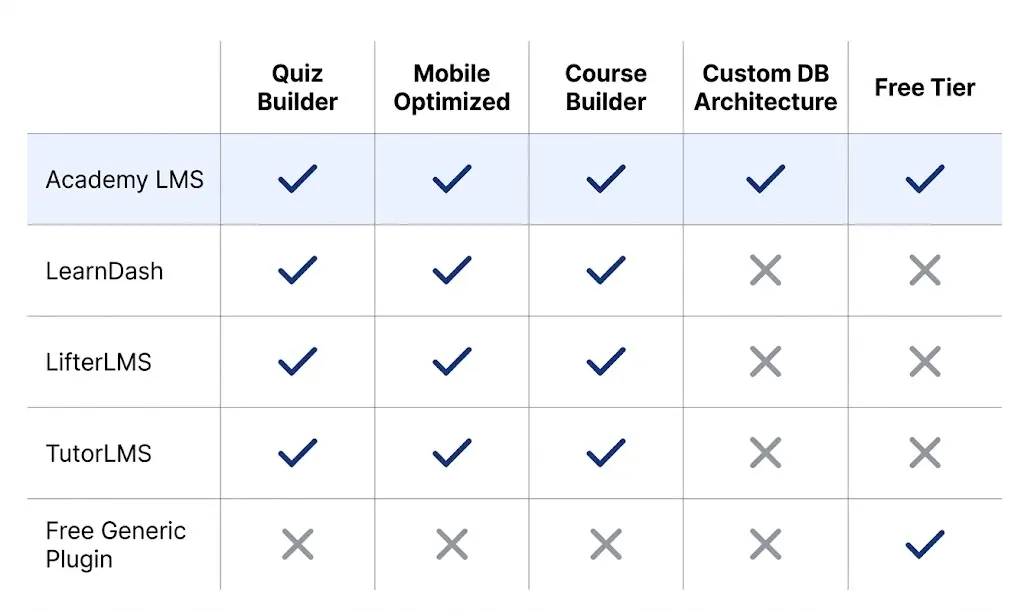
Academy LMS is built specifically for WordPress with a custom database architecture that keeps course data out of the wp_posts table. That structure produces faster load times for high-volume courses. The Academy LMS course builder lets instructors build structured, multi-section courses without any coding.
For a direct comparison, the guide to the best free LMS plugin for WordPress and the full breakdown of best LMS plugins for WordPress compared cover what each platform actually delivers across these requirements.
Launching Without a Completion Strategy
Most courses launch with no plan for what happens when a learner goes quiet.
A learner who hasn’t logged in for seven days is not taking their time. They’ve dropped out. They just haven’t said so officially.
A completion strategy has three parts: progress reminders (automated emails triggered by inactivity), accountability checkpoints (cohort calls or peer deadlines), and completion incentives (certificates, community access, or next-course discounts that unlock only on completion).
In practice, I’ve seen completion rates jump from 30% to over 65% by adding automated re-engagement emails and a visible progress bar. Neither change took more than a few hours to implement.
Which approach is right for you?
Frequently Asked Questions
What are the most common eLearning mistakes?What are the most common eLearning mistakes?
The most common eLearning mistakes are skipping audience analysis, writing unmeasurable objectives, overloading lessons with information, ignoring mobile design, using passive content only, and launching without a completion strategy. Each one directly reduces course completion rates.
What is the average eLearning completion rate?
Tech course completion rates average 34% (Mirasee, 2024). Courses that use active engagement strategies, including regular quiz questions, discussion boards, and progress incentives, consistently achieve rates above 65%.
How do I improve my eLearning course?
Audit your course for four things: lesson length, interaction frequency, mobile usability, and assessment quality. Start with the module that has the highest dropout rate and work backward to find where learners disengage.
Why do learners abandon online courses?
Learners abandon courses because the content doesn’t match their actual needs, lessons are too long and passive, or the course is hard to use on mobile. Lack of specific feedback and no visible progress indicator also contribute to dropout.
What makes a good eLearning course?
A good eLearning course has a clearly defined audience, measurable objectives, short lessons covering one concept each, at least one interaction point every five minutes, mobile-responsive design, and a plan to re-engage learners who go inactive.
How long should an eLearning lesson be?
Individual lessons should cover one concept at a time. In practice, that means 5-10 minutes for most skill-based topics. Anything longer should be split across two lessons to avoid cognitive overload.
What is cognitive overload in eLearning?
Cognitive overload happens when a lesson exceeds the learner’s working memory capacity, which holds roughly 4-7 items at once (Miller, 1956). When overloaded, learners stop retaining information regardless of their motivation level.
How does mobile design affect eLearning completion rates?
Poor mobile design is a direct dropout trigger. 67% of US college students use mobile for coursework (Mirasee, 2024). Courses that require zooming, have tiny tap targets, or use desktop-only video players consistently lose mobile learners before the first module ends.